Search Skill Studio AI ..


Author
Magda Targosz
Category
features-updates
Published date
Reading Time
11 min
Go back
Skill Studio AI’s newest SOP-to-video workflow turns dense procedures into short training videos fast. This update is built for teams that need clearer training, less editing, and faster publishing — and now adds an accuracy run and checker that keeps training content aligned with the latest source documents.
Last updated: July 2026
Contents
What is new in the SOP-to-video workflow?
Why does SOP-to-video matter for compliance training?
How does the SOP-to-video flow work?
Where does Skill Studio AI fit in?
How can you try the new feature?
Frequently Asked Questions
Key Takeaways
New workflow: Skill Studio AI now offers an SOP-to-video path that turns procedures into training videos in minutes.

Faster output: The platform says users can upload a document and generate a full course package in about 15 minutes.
Not just video: The output can include an AI presenter, quiz questions, a completion certificate, and a SCORM package.
Accuracy run and checker: Each course can be re-checked against the latest SOP or policy, so quizzes, narration, and certificates stay aligned when the source document changes.
Built for regulated teams: This matters most where SOPs, policies, and training changes move often, such as pharma, banking, and healthcare.
Better learner flow: Short video lessons are easier to review than long policy documents or 40-minute compliance videos.
Practical update: Skill Studio AI also supports policy PDF-to-training workflows with quizzes, subtitles, LMS export, and automatic update checks.
Try it now: The new SOP-to-video experience is available through the admin builder at training.skillstudio.ai/admin/sop-to-video.
Useful beyond one team: The same workflow helps L&D teams reuse one expert source across more training output without extra filming time, while the accuracy checker keeps all those assets in sync with the latest version.
This update is simple: Skill Studio AI is making it easier to turn SOPs into short training videos without starting from scratch — and to keep those videos correct when the source document changes. If your team already has procedures in Word, PDF, or slide form, the new workflow gives you a faster path from document to learner-ready content, plus an accuracy run that flags training that needs to be refreshed.
What is new in the SOP-to-video workflow?
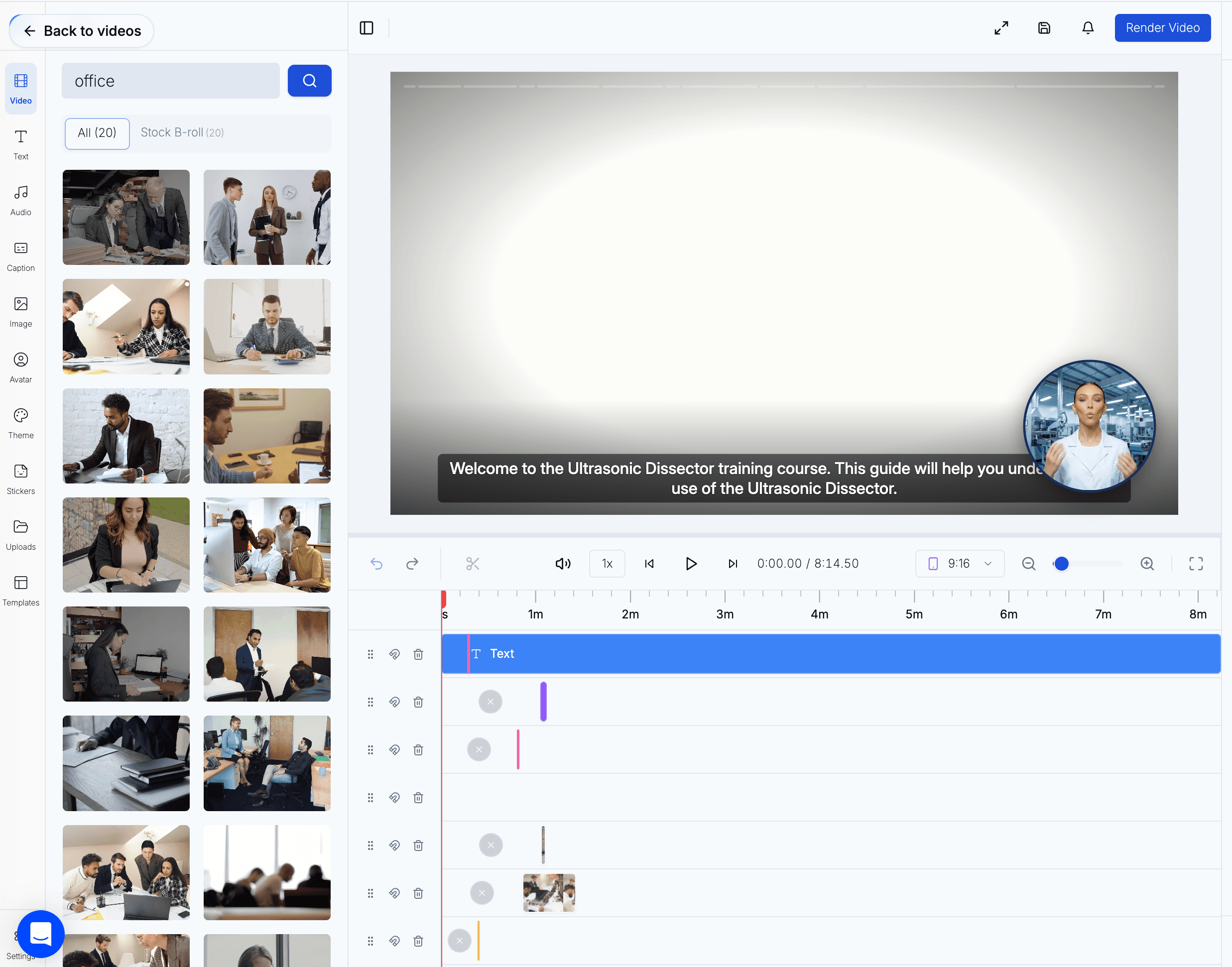
The new SOP-to-video workflow lets you convert procedural content into a structured video course instead of manually building lessons from scratch.
Skill Studio AI already supported document-to-video creation, but the recent SOP-focused flow makes the use case more direct for operations and compliance teams. The platform says it can read uploaded documents, extract key learning points, and generate an AI video presenter, quiz questions, a completion certificate, and a SCORM package in one pass.
The key differentiator in this release is the accuracy run and checker. After your initial course is generated, Skill Studio AI can re-run the SOP-to-video flow against an updated source document, compare it to the existing training, and highlight where narration, questions, or certificates no longer match the latest SOP. That gives teams a structured way to keep content current instead of recreating courses from scratch.
This matters because SOP content is usually dense and slow to repurpose. Skill Studio AI’s own guidance says it can generate policy-to-training videos in under 5 minutes, with a full upload-to-deploy workflow built around quizzes and LMS export. The accuracy checker then makes ongoing maintenance faster by automating the “does this still match the SOP?” step.
For teams comparing approaches, this is very different from basic video editing tools. It is closer to a training production line with a built-in quality gate, which is why the platform also fits broader document-to-video use cases such as policy PDFs and existing documents.
Why does SOP-to-video matter for compliance training?
SOP-to-video matters because people learn procedures faster from short visual lessons than from long static documents.
In regulated environments, the real problem is not writing the SOP. The problem is getting people to actually use it, remember it, and follow the latest version. Skill Studio AI addresses that by converting source documents into narrated video lessons and quiz-based checks.
The accuracy run and checker directly supports compliance. When a policy, regulation, or SOP is updated, teams can upload the new version, run an accuracy check, and see exactly which parts of the existing training need to be refreshed. That reduces the risk of learners following outdated guidance and creates a clearer audit trail for how training content tracks regulatory change.
The platform’s bank-focused example is useful here: it says it helps banks turn SOPs into on-brand training videos in minutes and keep them updated when procedures change. That same logic applies to pharma and other regulated teams, where update cycles can create stale training quickly. The accuracy checker adds an automated safety net so changes in FCA, DORA, MiFID II, or internal procedures are reflected in training without manual cross-checking line by line.
If you want a more complete view of the automation angle, the article on compliance training automation for pharma and healthcare shows how the workflow fits into broader training operations, not just one-off video creation.
How does the SOP-to-video flow work?
The workflow is straightforward: upload the SOP, let the AI structure it, review the output, run an accuracy check when the SOP changes, and publish the training asset.
Skill Studio AI’s document-to-video guidance says the process starts from the Library page, where users choose “Create New” and then select an AI Generate path or a template. The system can work from PDFs, Word documents, SOPs, slide decks, or policies, then generate a narrated lesson with assessments.
Its newer policy-to-video guide adds more concrete steps. Users upload a PDF, select an avatar and voice, add quizzes, and generate a training video in under 5 minutes. The guide also says the system can auto-generate 5 to 10 multiple-choice questions and render the final output in 2 to 4 minutes.
With the accuracy run and checker enabled, the flow extends:
When a source SOP or policy is updated, you upload the new version.
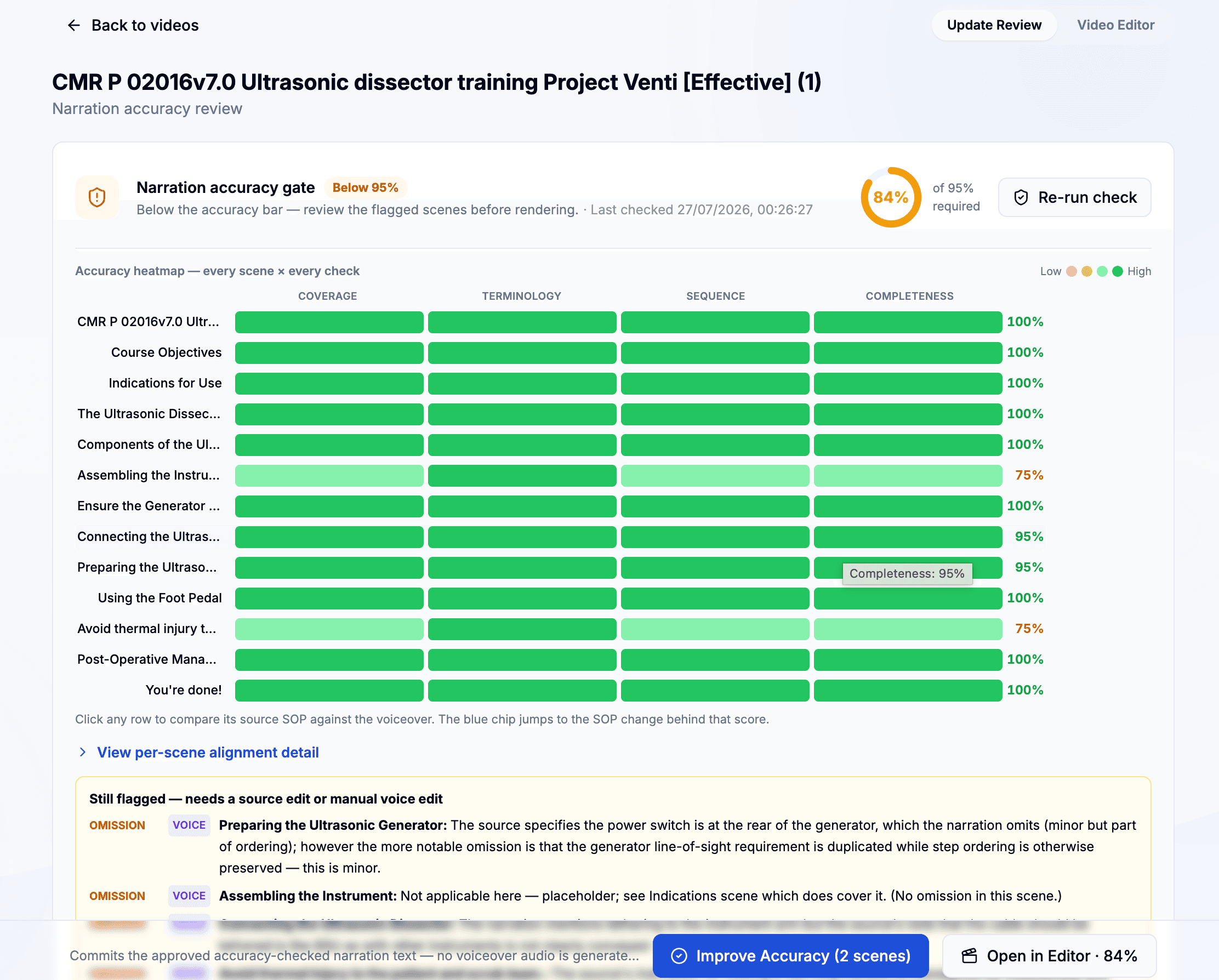
The accuracy checker compares the new document to your existing course structure, narration, quizzes, and certificates.
It flags sections where wording, steps, or rules have changed, and suggests updates to keep the training aligned.
You review, accept, or adjust those changes, then re-publish the updated course.
That speed is the point. A process that once took days of script writing, narration, and editing can now be reduced to a short review cycle, both at first creation and at each update. Skill Studio AI shows this through its AI presenter, multilingual narration, SCORM-ready export path, and automated accuracy checks when documents change.
If your team is already thinking about document conversion more broadly, the document-to-video AI solution and the policy PDFs to training update are the closest supporting references.
Step | What happens | Why it helps |
|---|---|---|
Upload | Add a PDF, Word file, SOP, or slide deck. | Uses existing source material instead of rewriting content. |
Extract | AI pulls out headings, text, and learning points. | Speeds up course structure and cuts manual rework. |
Generate | Create a video presenter, voiceover, quizzes, and subtitles. | Gives learners both explanation and knowledge checks. |
Export | Download MP4 or push to an LMS with SCORM. | Makes deployment easier for training teams. |
Accuracy check | Re-run the course against the latest SOP or policy and flag mismatches. | Keeps training content synchronized with source documents and reduces compliance risk. |
Where does Skill Studio AI fit in?
Skill Studio AI fits best when your team needs one expert source turned into many training assets fast — and needs those assets to stay accurate as documents change.
The platform is not positioned as a generic LMS or a simple video editor. Its value is in converting dense SOPs, policies, and manuals into structured training output that can be reviewed, updated, and delivered at scale. That is why the avatar and interactive module features matter as much as the video itself, and why the accuracy checker is a core differentiator for compliance teams.
This also makes the product useful for teams that already use LMS tools but need faster content creation and maintenance. The system can generate SCORM packages and can plug into existing learning environments, which helps when you do not want to rebuild your training stack but still need a reliable way to keep courses aligned with the latest documentation.
For a deeper look at the underlying conversion pattern, the article on AI platform for SOP-to-training conversion with audit trails explains the compliance use case in more detail. If you are comparing tool types, 10 best SCORM authoring tools 2026 is also relevant because it frames where document-to-course automation and automated accuracy checking fit.
Skill Studio AI also supports multilingual training delivery, which is useful when one SOP has to reach different sites or regions. That reduces the usual problem of creating the same course again and again for each audience — and the accuracy checker helps ensure that every localized version still reflects the latest source document.
How can you try the new feature?
You can try the SOP-to-video workflow directly in the admin builder at training.skillstudio.ai/admin/sop-to-video.
That is the fastest way to see how the workflow handles a real SOP, a policy PDF, or a procedure manual. The platform’s public materials suggest the experience is designed around quick upload, automatic structuring, and fast generation, so the admin flow is where that is most visible.
Once your first course is live, you can enable the accuracy run to see how the checker works when your source document changes. Upload a revised SOP or policy, run the check, and review the suggested updates to narration, quizzes, and certificates before you publish a refreshed version.
If you want a nearby example before you upload your own file, the frontline training use case shows how the platform handles high-volume training delivery in many languages. For teams focused on interactive learning rather than passive video, the interactive AI avatars guide shows the same content model in a more hands-on format.
For regulated teams, that combination is the useful part: video for speed, quizzes for comprehension, SCORM export for deployment, and an accuracy checker for ongoing alignment with source documents. Skill Studio AI’s workflow is strongest when you need to keep content moving without waiting on full production cycles, but cannot compromise on whether the training still matches the latest SOP.
Frequently Asked Questions
What is SOP-to-video in Skill Studio AI?
SOP-to-video is the workflow that turns a written standard operating procedure into a training video. Skill Studio AI uses the source document to generate a presenter-led lesson, quiz questions, and exportable course output. The latest update adds an accuracy run and checker that keeps the training aligned when the SOP changes, which makes it useful for compliance, onboarding, and process training.
How long does it take to create a video from an SOP?
Skill Studio AI says the workflow can generate a complete course package in about 15 minutes. Its policy-to-video guide also says users can create a training video in under 5 minutes, with rendering in 2 to 4 minutes. The exact time depends on review and content length. Accuracy checks on updated documents are typically much faster, because the system is comparing against an existing course rather than generating one from scratch.
Can I use Word, PDF, or slide files?
Yes. Skill Studio AI says it accepts PDF, Word documents, SOPs, and slide decks as source material. That makes it practical for teams that already keep procedures in document form and do not want to rebuild them manually. The same file types can be used later for accuracy runs when those documents are updated.
Does the output include quizzes and certificates?
Yes. Skill Studio AI says the generated course can include comprehension quiz questions and a completion certificate. Its policy-to-training flow also supports auto-generated multiple-choice questions and LMS-ready delivery. The accuracy checker reviews these elements against the latest SOP or policy so that questions and certificate criteria stay consistent with current requirements.
Can I deploy the training in my LMS?
Yes. Skill Studio AI says it generates a SCORM package that is ready to load into your LMS. It also supports export options such as MP4, which gives teams flexibility if they want to publish outside the LMS first. This is useful when content has to move quickly across systems, and the accuracy checker helps ensure that the SCORM package you deploy still reflects the latest documentation.
Is this useful for regulated industries?
Yes. The platform’s examples and guidance focus on banks, compliance teams, and regulated documents like FCA, DORA, and MiFID II materials. That makes the SOP-to-video workflow especially relevant where procedures change often and training has to stay current. The built-in accuracy run and checker is designed for exactly these environments, where demonstrating that training matches the latest SOP is a core compliance requirement.
Where should I start if I want to see the feature now?
Start with the SOP-to-video admin flow at training.skillstudio.ai/admin/sop-to-video. If you want context first, the document-to-video update and the interactive avatar guide are useful companions. Together they show how the platform handles both production speed and learner experience, and the accuracy checker shows how it keeps that content correct when your source documents evolve.