Search Skill Studio AI ..


Author
Magda Targosz
Category
features-updates
Published date
Reading Time
9 min
Go back
Ask Candace shipped and is not a regular chatbot but a smart reviewer that actually knows what you’re working on. That’s the big win here: instead of tossing out generic AI fluff, it gives feedback that sounds grounded in the exact content in front of it.
The feedback from customers just summarises it well:
"My favorite thing of your tool was Candace. I Loved Candace. I love the fact that she knew what content I was using. She could look at the contents. It was genuinely like a proper. It wasn't like an AI general response. It was a specific response. Are you looking at this? Which piece of content? Oh, yeah, no, I can see what you're doing and then feeding back to you. I found Candace a fantastic tool, honestly."
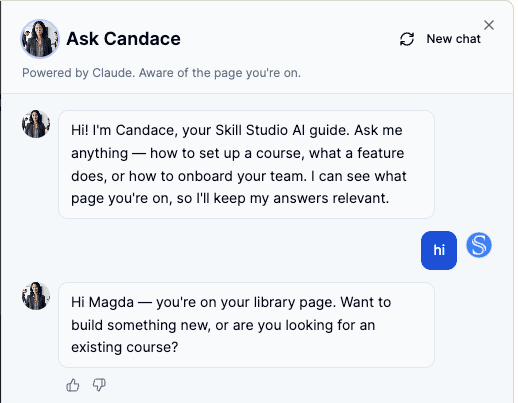
In Skill Studio AI, that kind of context awareness is a big deal. The platform is built to turn SOPs, compliance docs, and procedural manuals into training that stays tied to the source, the version, and the real use case.
This page breaks down what Ask Candace seems to do, why context makes such a difference, and what the user feedback says about the experience. It also shows how the feature fits into the larger Skill Studio AI workflow, where speed matters, but accuracy matters more.
Contents
Key takeaways
What Ask Candace is
Why context matters in AI training tools
What users are saying
How it fits into Skill Studio AI
What teams should look for in a context-aware assistant
Frequently asked questions
Key takeaways
Ask Candace is context-aware. It appears to respond to the actual content a user is viewing, not just the prompt they type.
Specific beats polished. The strongest feedback is about relevance, not just AI smoothness.
Source visibility changes everything. If an assistant can inspect the material, it can give answers that are much more useful.
Users notice when AI feels grounded. The feedback points to a tool that feels attentive, not random.
Skill Studio AI is built for this kind of workflow. It turns dense documents into audit-ready training with version control and role-based delivery.
In regulated teams, traceability matters. Training tools need to stay close to the source material so updates, approvals, and reviews don’t turn into a mess.
The bigger story is scaling expertise. Skill Studio AI is designed to turn one SME’s knowledge into reusable courses without starting from scratch every time.
The user quote is the proof point. The strongest signal here is not a benchmark, but a user saying Candace felt specific, helpful, and genuinely useful.
What is Ask Candace?
Ask Candace is a content-aware AI assistant inside Skill Studio AI. The standout part is simple: it seems to look at the material you’re working on and respond to that specific content, instead of acting like a generic chatbot.
That makes a lot of sense in training creation. The best help is usually not broad advice. It’s a sharp answer tied to the exact sentence, slide, SOP, or module you’re editing. Skill Studio AI already works this way by turning SOPs, compliance docs, and manuals into training assets with role-targeted delivery and version control, so a context-aware assistant fits right in.
For regulated teams, that’s especially useful. If the assistant can see the source material, it’s much more likely to stay aligned with the document instead of drifting into vague suggestions that don’t survive review.
Where to find Ask Candace?
It is just in the top navigation right next to Create training button

Why does context matter in AI training tools?
Because training work is usually document-first, not chat-first. If an assistant knows which file, section, or module you’re working on, it can respond with feedback that is actually relevant.
That matters a lot in compliance-heavy workflows, where one sloppy suggestion can create extra review cycles. Skill Studio AI’s focus on audit-ready training, version control, and role-targeted delivery makes context feel less like a bonus and more like part of the job.
There’s also a simple practical reason this feels better: teams working from SOPs, manuals, and policy docs don’t want AI that freelances. They want help that respects the source text. That’s why Ask Candace feels closer to a reviewer who has actually read the page.
It also lines up with Skill Studio AI’s broader positioning around compliance training automation, audit-ready course creation, and document-driven output. The whole point is to keep the training grounded in the original material.
What are users saying about Ask Candace?
The feedback is strong because it praises both usefulness and specificity. One user said, “My favorite thing of your tool was Candace. I Loved Candace,” and went on to explain that Candace knew what content was being used and responded in a way that felt specific instead of generic.
That matters because users rarely remember AI for being “AI.” They remember whether it saved time, reduced friction, and understood the thing they were doing. The line “Are you looking at this? Which piece of content? Oh, yeah, no, I can see what you're doing” gets to the heart of it: the tool feels aware of context.
The quote also suggests trust. When someone says a response felt like a “proper” answer, that’s usually the moment a tool stops feeling like a demo and starts feeling useful. That’s a pretty strong signal for any product.
It’s the same reason people like tools that stay anchored to the source material instead of producing generic course filler. When the output is grounded, the whole workflow feels easier.
How does Ask Candace fit into Skill Studio AI?
Ask Candace is basically a practical layer on top of the main workflow: take source content, turn it into training, then refine it with help that understands the source. That makes it a natural extension of Skill Studio AI’s document-to-course approach, version control, and role-based delivery.
Skill Studio AI isn’t trying to be a generic LMS or a basic video editor. It’s built for instructor scaling, which means one SME’s knowledge can be turned into unlimited courses without dragging everyone back into the studio for another recording session. That’s a big deal for regulated industries that need repeatable, auditable updates.
Ask Candace strengthens that model because it helps users stay close to the actual content while they build. In practice, that means fewer vague suggestions, less back-and-forth, and a faster path from raw material to reviewable training assets.
The same idea shows up in other parts of the platform too, including AI avatar delivery, multilingual compliance training, and content-aligned course generation. The value is not just speed. It’s speed plus fidelity to the source.
For teams dealing with Annex 1, FDA remediation, or CAPA training, that combination matters. The workflow is rarely just “make a video.” It’s “understand the document, check the detail, update the version, and ship something people can actually use.” Ask Candace feels built for that middle step.
What should teams look for in a context-aware training assistant?
Three things matter most: source awareness, specificity, and fit with the broader workflow. If an assistant can’t see the content, can’t reference it directly, or can’t work inside a controlled authoring process, it will probably create more work than it saves.
In regulated settings, the bar is even higher. A good assistant should support review, not replace it. It should make the source easier to work with, not bury it under generic AI output. That’s why Skill Studio AI’s emphasis on audit-ready records, version control, and multilingual delivery matters alongside Ask Candace.
There’s also the human side of this. Training teams don’t want a flashy demo. They want a tool that understands which SOP, slide, or manual is in play. The feedback on Candace suggests users notice when the assistant behaves like it has actually read the page, and that’s exactly the kind of behavior that makes adoption easier.
If a team is comparing workflows, it helps to think in terms of instructor scaling, content fidelity, and production speed. The best setup is the one where all three work together.
Frequently asked questions
What is Ask Candace in Skill Studio AI?
Ask Candace is a context-aware assistant inside Skill Studio AI that appears to inspect the content you’re working on before responding. The big value is specificity: it doesn’t feel like a generic chatbot. Instead, it gives feedback tied to the exact material on screen, which is especially useful when you’re building training from SOPs, manuals, or compliance docs.
Why do users like Ask Candace so much?
Because it feels attentive and specific. The feedback says Candace knew what content was being used and responded in a way that felt “proper,” not generic. That kind of interaction saves time and builds trust, because users can tell the assistant is actually grounded in the work.
How does Ask Candace help regulated training teams?
It helps by keeping feedback close to the source content. In regulated training, teams need answers that reflect the document they’re editing, not broad suggestions that wander away from the approved material. Ask Candace fits Skill Studio AI’s broader workflow of audit-ready training, version control, and role-based delivery, which helps keep content aligned during review.
Is Ask Candace a replacement for human review?
No. Its value is in supporting review, not replacing it. Human oversight still matters, especially in compliance-heavy industries where source accuracy and approval workflows are critical. Think of it as a smarter working layer between the original document and the final training asset.
What makes Ask Candace different from a normal AI chatbot?
A normal chatbot usually answers from the prompt alone. Ask Candace appears to respond based on the actual content a user is viewing, which makes its answers feel more specific and relevant. That difference matters in course creation, because the quality of the response depends on whether the assistant understands the source material, not just the question.
How does Ask Candace fit with Skill Studio AI’s main product?
It fits as a content-aware helper inside a platform built to turn dense source material into training. Skill Studio AI already focuses on SOPs, compliance docs, procedural manuals, multilingual localization, and version control. Ask Candace strengthens that workflow by helping users work with the source content in a more precise, practical way.