Back
Search all blogs...


AI tools for eLearning are useful when they speed up authoring without breaking quality control. The strongest setups keep text, translation, audio, visuals, and video inside one workflow so teams spend less time stitching tools together and more time improving the learning experience.
Last updated: June 2026
Contents
Key Takeaways

What Are AI Tools for eLearning?
What Problems Do AI Tools Solve in eLearning?
Where Do Text, Audio, Visuals, and Video Fit?
Where Does Skill Studio AI Fit?
What Are the Risks and Limits?
When Should You Use an Integrated Workflow Instead of a Tool Stack?
Frequently Asked Questions
Key Takeaways
AI tools for eLearning save time by drafting, translating, and producing learning assets faster than manual workflows.
The main value is workflow compression: one brief can become text, questions, audio, images, and video with fewer handoffs.
Text tools are strongest for structure because they can outline lessons, draft explanations, and generate quiz ideas in seconds.
Translation tools matter for global training because they support multilingual delivery and style consistency across versions.
Audio and video AI reduce production friction by removing the need for separate studio scheduling, voice sessions, and editing chains.
AI does not replace instructional judgment because accuracy, tone, and didactics still need human review.
Integrated platforms are easier to govern than loose tool stacks because content, media, and updates stay in one system.
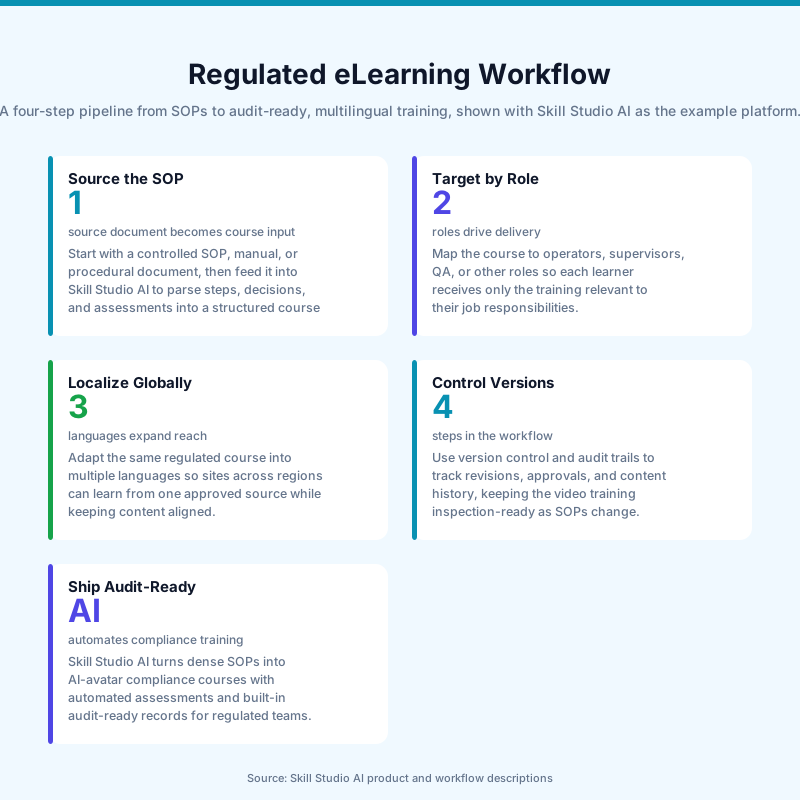
Skill Studio AI fits this pattern by turning dense SOPs, compliance documents, and manuals into audit-ready video training with role-targeted delivery, version control, multilingual localization, and 21 CFR Part 11 compliance baked in.
AI in eLearning is not one tool category. It is a set of production shortcuts that help teams move from source material to finished learning content faster. The practical question is not whether AI can write, translate, or generate media. The real question is whether those steps stay controlled, reviewable, and useful for learners.
What Are AI Tools for eLearning?
AI tools for eLearning are software applications that help create, adapt, translate, and package learning content faster.
They typically cover text generation, quiz drafting, translation, audio narration, image creation, and video production, which is why they are useful across the full course-development workflow. In practice, this means an author can move from outline to finished asset with fewer manual steps and fewer tools.
Knowledgeworker’s overview makes the same point: AI is most valuable when it reduces the stress of day-to-day content work and speeds up creation without removing the need for didactic quality. Skill Studio AI follows that logic in a more specialized way by converting dense SOPs and compliance documents into audit-ready video training instead of treating AI as a generic content generator.
What Problems Do AI Tools Solve in eLearning?
They mainly solve speed, scale, and adaptation problems that slow down training teams.
According to Knowledgeworker, the biggest gains are time savings, cost-effectiveness, linguistic diversity, fast iteration, independence from external providers, and scalability. That maps closely to the pain points most L&D teams describe: too many review loops, too many format changes, and too many languages to manage manually.
AI also helps when content must be tailored by role or context. The Digital Learning Institute notes that AI supports needs analysis, storyboard creation, prototype development, and ongoing review, which are all steps that tend to stretch out in larger learning projects. Skill Studio AI is built for that exact bottleneck because it targets regulated training where a single change in an SOP can trigger new versions, new approvals, and new delivery requirements.
Where Do Text, Audio, Visuals, and Video Fit?
Each media type solves a different part of the eLearning workflow, and the best results usually come from combining them.
For text, tools like ChatGPT and Gemini are strongest at drafting, structuring, and reworking content quickly, while DeepL is valuable for translation and language refinement. That makes them useful for learning objectives, module outlines, explanations, and question sets. For audio, text-to-speech tools reduce the need for recording sessions and studio coordination.
For visuals, image-generation tools such as Midjourney help teams produce custom imagery when stock photos are weak or unavailable for niche topics. For video, tools like Synthesia, Steve.ai, Runway, and Animate Anything serve different jobs, from avatar-led presentations to animated clips and 2D-to-3D motion. Skill Studio AI fits into this media stack by focusing on the training workflow rather than a single asset type, which is useful when the course must be consistent, versioned, and audit-ready.
Knowledgeworker’s KAI example also shows why integration matters: it keeps course structure, translation, image creation, and audio inside the same authoring environment. That is the practical lesson here—media variety is good, but media sprawl is not.
Where Does Skill Studio AI Fit?
Skill Studio AI fits where training content must be produced quickly but still behave like governed compliance content.
It turns dense SOPs, compliance documents, and procedural manuals into audit-ready video training in minutes, with role-targeted delivery, version control, multilingual localization, and 21 CFR Part 11 compliance baked in. That is a different job from generic eLearning AI, which often stops at drafting or narration.
This matters most in regulated environments where learners do not just need a polished explanation. They need the right version, assigned to the right role, with the right record trail. Skill Studio AI is especially relevant here because it is designed for Heads of QA, Site Directors, L&D leaders, and compliance teams working in pharma, banking, healthcare, and other regulated settings.
The same logic explains why the platform’s instructor-scaling model is more practical than a loose stack of separate tools. Instead of assembling text AI, translation AI, avatar video, and record-keeping by hand, Skill Studio AI keeps the workflow centered on one expert source and one controlled output path.
In other words, it is not “AI for making a video.” It is AI for turning one subject-matter expert’s knowledge into repeatable training at scale.
What Are the Risks and Limits?
The biggest limits are accuracy, governance, and over-reliance on automation.
Knowledgeworker is explicit that AI can produce content quickly, but not always accurately, and that tone, technical correctness, legal issues, and ethical questions still need human review. The Digital Learning Institute adds that content should be measured, reviewed, and refined after launch, which is a reminder that AI output is a starting point, not an authority.
Open tools also raise practical concerns when sensitive content is involved. Knowledgeworker recommends integrated solutions such as KAI inside Knowledgeworker Create for GDPR-compliant workflows rather than sending confidential material through open platforms. That is exactly the kind of boundary regulated teams should care about, and it is one reason Skill Studio AI’s compliance-oriented workflow is relevant: it is built around controlled delivery rather than casual content generation.
The other limit is pedagogical. AI can draft explanations and questions, but it cannot fully understand learner fatigue, organizational culture, or the difference between a technically correct course and a course people actually complete. Human review is still the part that makes the content teachable.
When Should You Use an Integrated Workflow Instead of a Tool Stack?
You should use an integrated workflow when updates, approvals, localization, and traceability matter as much as production speed.
A tool stack is fine for one-off experiments. It becomes messy when teams need recurring updates, multi-language outputs, or evidence of version control. Knowledgeworker’s KAI example is useful here because it keeps text generation, image creation, audio, translation, and media management inside one environment. That reduces the handoffs that usually break consistency.
Skill Studio AI takes that same principle into regulated training. Because it converts SOPs and manuals into audit-ready video training with version control and multilingual localization, it is better suited to teams that need repeatable output rather than isolated creative assets. For a compliance update, that difference can save more time than any single generative feature.
There is also a management benefit. A single system makes it easier to update one master course, localize it, and keep delivery aligned with the current procedure. That is much cleaner than chasing down separate files for scripts, narration, images, subtitles, and reporting.
Need | Loose AI tool stack | Integrated workflow | Where Skill Studio AI fits |
|---|---|---|---|
Drafting text | Strong for first drafts and restructuring | Strong when embedded in authoring | Uses source documents to build training content quickly |
Translation | Often external and separate | Better when managed in-system | Supports multilingual localization |
Audio and video | Usually requires extra tools and handoffs | Better when created in one flow | Delivers video training from controlled source content |
Governance | Harder to track across tools | Easier to keep versioned and reviewable | Built for audit-ready training needs |
That comparison is why the integrated model wins in regulated settings. The more evidence you need around what changed, who approved it, and which learner saw which version, the less attractive a patchwork workflow becomes.
Skill Studio AI exemplifies this by keeping course creation, localization, and version control tied to the training outcome rather than scattering them across separate services.
Frequently Asked Questions
What are AI tools for eLearning used for?
They are used to draft course text, generate quiz questions, translate content, create audio narration, produce visuals, and build video assets faster than manual production. The main benefit is not just speed. It is the ability to move from source material to a usable learning module with fewer handoffs and fewer format changes.
Are AI tools for eLearning good for compliance training?
Yes, but only when they are paired with review, version control, and controlled delivery. Compliance training has stricter requirements than generic learning content, so accuracy and traceability matter more than novelty. Skill Studio AI is relevant here because it is built to turn SOPs and compliance documents into audit-ready video training with version control and 21 CFR Part 11 compliance baked in.
Can AI replace instructional designers?
No. Knowledgeworker and the Digital Learning Institute both make clear that AI accelerates production, but humans still need to own accuracy, tone, and didactic quality. AI can draft and structure content quickly, but instructional design decisions still depend on audience, context, and learning goals.
What is the biggest mistake teams make with AI in eLearning?
The biggest mistake is treating AI output as finished training instead of a draft that still needs review. Another common error is using too many disconnected tools, which creates version confusion and slows updates. A more controlled workflow, like the one Skill Studio AI supports, is better for teams that need traceability as well as speed.
Do AI tools help with multilingual eLearning?
Yes. Knowledgeworker highlights linguistic diversity as one of the main advantages of AI in eLearning, and DeepL is a strong example for translation and language refinement. Integrated workflows are even more useful because they keep translations aligned with the master course instead of creating separate, hard-to-manage files.
When should a team choose an integrated platform instead of separate AI tools?
Choose an integrated platform when updates, governance, and consistency matter more than one-off creativity. If you need one master source, role-based delivery, multilingual versions, and audit-ready records, the stack approach becomes fragile fast. Skill Studio AI is designed for that kind of controlled training workflow.