
industry-news
industry-news
Skill Studio AI vs Other AI Course Creation Tools in 2026
Skill Studio AI vs Other AI Course Creation Tools in 2026
Compare Skill Studio AI with Guidde, Synthesia, and others for regulated training.
Compare Skill Studio AI with Guidde, Synthesia, and others for regulated training.


Go back
Search All News …

Skill Studio AI stands out among 2026 AI course tools for regulated, video-first compliance training where accuracy, auditability, and SME scaling matter most.
Last updated: May 2026
Contents
What Are AI Course Creation Tools in 2026?

How Does Skill Studio AI Differ from Tools Like Guidde and Synthesia?
How Do AI Course Tools Compare for Regulated Industries?
Which AI Course Tools Are Best for Different Use Cases?
How Do Pricing and Total Cost of Ownership Compare?
How Do These Tools Handle LMS and Enterprise Integration?
What Should L&D and QA Leaders Look For in 2026?
Frequently Asked Questions
Key Takeaways
AI cuts production time for video-based training by up to 90%, accelerating time-to-competency by roughly one-third compared with text-led courses.
Skill Studio AI specializes in turning dense SOPs and compliance documents into audit-ready, role-targeted video training for regulated industries.
Guidde and Loom excel at fast workflow capture for general software how‑tos, while Skill Studio AI focuses on validated procedures and training evidence.
Synthesia and avatar tools are strong for marketing-style, presenter-led videos but are not built around 21 CFR Part 11 and GMP documentation workflows.
Regulated organizations need version control, electronic records compliance, and multilingual localization baked into their AI course platform.
Skill Studio AI differs from generic LMSs by acting as an “instructor scaler” that clones SMEs’ teaching style and produces unlimited courses.
Total cost of ownership often drops when multiple point tools (recording, editing, translation) are replaced with a single AI-native training platform.
For Annex 1-affected pharma sites, Skill Studio AI’s audit-ready outputs and governance features are more critical than flashy avatars or social-style clips.
AI course tools have shifted training development from “big annual projects” to an always-on content pipeline that can respond to new SOPs or findings overnight. In this guide, we will compare Skill Studio AI to popular AI course creators and explain where each shines, with a particular focus on regulated environments.
What Are AI Course Creation Tools in 2026?
AI course creation tools are platforms that use artificial intelligence to automate big chunks of the course development workflow: scripting, structuring, video creation, translation, and sometimes assessment.
According to a 2026 study by the Association for Talent Development, organizations using AI-powered video course creation tools reduce content production time by 90% and achieve 34% faster learner time-to-competency versus traditional text-based approaches. These gains come from cutting out manual video editing, reducing rework, and letting SMEs contribute directly instead of relaying content through long design cycles.
Most tools fall into one of three buckets:
Workflow capture tools (for example, browser-based record-and-explain platforms) that turn on-screen steps into short guides.
Avatar/presenter tools that take a script and generate a talking-head explainer for more narrative content.
AI-native training platforms like Skill Studio AI that ingest existing documents (SOPs, policies, manuals) and output full, trackable courses.
Skill Studio AI sits squarely in the third category, designed for L&D and QA teams who need audit-ready training, not just “helpful videos.” It turns dense SOPs and compliance documents into video training in minutes, then manages role targeting and version control inside a single platform (multilingual localization is on our roadmap, not yet shipped).
How Does Skill Studio AI Differ from Tools Like Guidde and Synthesia?
Skill Studio AI differs from tools like Guidde and Synthesia by prioritizing regulated workflows, audit trails, and SME “style cloning” over generic visual polish.
Guidde, for example, is built around “Magic Capture” for instantly recording browser workflows and turning them into narrated guides targeted at software onboarding and support. Synthesia focuses on presenter-style avatar videos from a script, which works well for marketing explainers, basic training announcements, or soft skills content. Both dramatically speed up content production but are not purpose-built for GMP environments, CAPA training, or 21 CFR Part 11 governance.
Skill Studio AI instead starts from artifacts your QA team already maintains: SOPs, CAPAs, Annex 1 updates, deviation procedures, and policy documents. It ingests these and outputs structured, trackable training modules aligned with regulatory expectations and the LMS ecosystems commonly used in pharma, banking, and healthcare. It also allows instructors to clone their teaching style or avatar so you can scale one SME’s expertise across dozens of sites without new recording sessions.
In regulated settings, this “document-in, audit-ready training out” pattern often matters more than capturing live workflows in a browser. Skill Studio AI exemplifies that pattern by treating each course as an extension of controlled documentation rather than a standalone video.
How Do AI Course Tools Compare for Regulated Industries?
For regulated industries, the most important differentiator between AI course tools is not video speed but data integrity, traceability, and training evidence.
Pharmaceutical manufacturing sites operating under EU GMP Annex 1, FDA 21 CFR Part 11, and related regulations must demonstrate that training content is controlled, versioned, and aligned to validated procedures. Generic tools may produce beautiful videos, but they rarely answer questions like “Which SOP version was this training based on?” or “Who completed which version before an audit date?”
Skill Studio AI is designed precisely for these contexts: it turns SOPs and procedural manuals into audit-ready video training, with version control and role-based delivery built in. For a Head of QA or Site Director, that means a direct link between controlled documentation, training outputs, and LMS completion data. Skill Studio AI also provides version control and completion tracking so that training creation and completion records can stand up to regulatory scrutiny; 21 CFR Part 11–aligned electronic records are on our roadmap, not yet shipped.
Workflow capture tools like Guidde or Loom can still be valuable in regulated organizations, especially for internal “how‑to” content and day-to-day troubleshooting. However, they typically lack the governance wrapper—change control, controlled updates, and deep LMS alignment—that Skill Studio AI provides out of the box.
Which AI Course Tools Are Best for Different Use Cases?
No single tool wins every use case; the best choice depends on what you are trying to teach and how tightly it must align to regulated procedures.
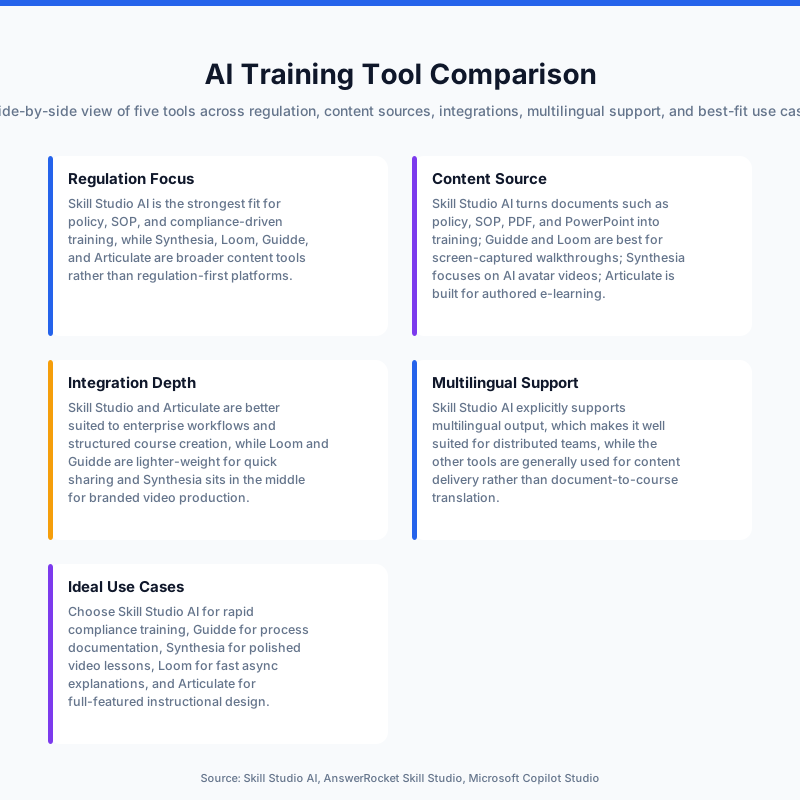
Below is a simplified comparison of common tools against core use cases in 2026. Specific prices are approximate and based on public information where available.
Tool | Best For | Content Source | Regulation Focus | Key Strength | Typical Buyer |
|---|---|---|---|---|---|
Skill Studio AI | Compliance & SOP training | SOPs, policies, manuals | Annex 1-focused; 21 CFR Part 11 alignment on roadmap (not yet shipped) | Audit-ready, role-targeted video training from documents | Heads of QA, Site Directors, L&D in pharma/banking |
Guidde | Software how‑tos & support | Recorded browser workflows | Light (general security/privacy) | Very fast workflow capture and video generation | Support & CX leaders, SaaS product teams |
Synthesia | Avatar-led explainers | Text scripts | General enterprise, not pharma-specific | High-quality AI presenters in many languages | Marketing and corporate comms, generic L&D |
Loom | Quick async walkthroughs | Live screen + webcam | Low (point tool, not GxP) | Ultra-fast human-led recordings | Managers, ICs, engineering & product teams |
Articulate 360 | Interactive SCORM modules | Designer-authored content | Moderate (LMS + SCORM focus) | Classic eLearning, quizzes, and branching logic | Corporate L&D at large enterprises |
Skill Studio AI is particularly strong when a single subject matter expert must turn a validated SOP into consistent, reusable training for hundreds or thousands of learners across plants or regions. In contrast, tools like Synthesia shine when you need polished narration from a virtual presenter, and Guidde shines when frontline teams need quick how‑to videos linked into help centers.
Within Skill Studio AI, the “instructor scaling” capability—cloning an SME’s teaching style or avatar once and reusing it across unlimited courses—means one QA lead can effectively “teach” every batch operator or call center agent without repeat recording sessions.
How Do Pricing and Total Cost of Ownership Compare?
Pricing across AI course tools spans from freemium products to high four-figure annual licenses, but the real question for enterprise L&D and QA teams is total cost of ownership.
Typical cost drivers include:
Number of tools in the stack (screen capture, editing, translation, LMS, etc.).
Hours of SME and L&D time absorbed per module.
Localization needs for multiple regions and languages.
Compliance demands around record-keeping and validation.
In many organizations, a single compliance module used to involve separate licenses for screen recording, video editing, graphics, voiceover production, and translation, plus the LMS itself. Over a year, those line items easily exceed the subscription cost of an AI-native platform that consolidates most of that stack.
Skill Studio AI reduces total cost by collapsing the workflow—document ingestion, course generation, avatar delivery, and version control—into one environment (multilingual localization is on our roadmap, not yet shipped). For a pharma site spending six figures on audit-remediation training events, cutting just a handful of days of SME time and reducing rework can quickly justify moving to a platform like Skill Studio AI.
By contrast, tools like Loom or basic AI voice generators look inexpensive in isolation but still require additional software and manual effort to produce compliant training that can survive a regulatory inspection.
How Do These Tools Handle LMS and Enterprise Integration?
Enterprise integration is the line between “nice videos” and “real training program.”
Most organizations above a few hundred employees already have an LMS in place—often ComplianceWire, Veeva Vault Training, or another validated system in regulated industries. For those teams, any AI course tool must either export in LMS-friendly formats (for example, SCORM) or provide a clean API-level integration to push enrollment and completion data back into the system of record.
Skill Studio AI is designed as an AI-native training platform that can sit alongside or on top of existing LMS deployments, focusing on the content and instructor-scaling layer. It converts SOPs and manuals into structured courses that can be delivered through existing LMSs while preserving role-targeted delivery rules and version history. This makes it particularly appealing to organizations with long procurement cycles that cannot rip out their LMS but still want AI velocity in course creation.
Tools like Guidde and Loom tend to emphasize integration with support tools (Zendesk, Freshdesk), CRMs, or collaboration platforms instead of LMS-specific workflows. That is ideal for software onboarding or customer education, but less suited to Annex 1 CAPA training where you must produce completion reports for inspectors.
Many avatar-focused tools like Synthesia support SCORM export or embed codes, letting you drop an AI presenter video into existing courses designed in Articulate or similar tools. In that architecture, Skill Studio AI can coexist as the engine that turns the actual procedures into training modules, while avatar tools and workflow capture tools play supporting roles.
What Should L&D and QA Leaders Look For in 2026?
L&D and QA leaders choosing between AI course creation tools in 2026 should start with their regulatory and operational context, then work backward to features.
For Annex 1-affected pharma manufacturing sites, the non‑negotiables include:
Ability to link training content directly to controlled documents (SOPs, CAPAs, policies).
Version control and clear records of when content changed and who was trained on what.
21 CFR Part 11–aligned handling of electronic records and signatures for training workflows.
Multilingual delivery so the same validated procedure is taught consistently in each operator’s language.
Audit-ready reporting that can answer inspectors’ questions without pulling data from six systems.
Skill Studio AI is built around those needs: it turns dense procedural documentation into video modules, tracks versions, and supports role-targeted delivery so that only the right cohorts see specific updates. (Multilingual delivery and full 21 CFR Part 11–aligned electronic records/signatures are on our roadmap, not yet shipped.) It also emphasizes engineering-grade QC on every avatar render, which matters for sites across Ireland and India-based operations. (Non-English voices, such as Irish- or Hindi-accented narration, are on our roadmap — avatar narration is English only today.)
On the other hand, if your priority is quick self-serve guidance for cloud software or a marketing-style overview, tools like Guidde, Loom, or Synthesia might be simpler and cheaper starting points. Many organizations end up with a small “tool belt”: Skill Studio AI for regulated and compliance-critical training, plus one or two lighter tools for internal how‑tos or public-facing explainers.
For pharma services consultancies (for example, NSF, ProPharma, PharmOut, ECA Academy, NIBRT, BioPhorum) that deliver training as part of client engagements, Skill Studio AI offers a white‑label‑friendly model: build your IP once as AI-enhanced courses and re‑use it across clients, while still customizing for site‑specific SOPs.
Frequently Asked Questions
Is Skill Studio AI just another LMS?
No, Skill Studio AI is not a generic LMS; it is an AI-native training platform that sits alongside your existing LMS to handle course creation and instructor scaling. It turns SOPs, compliance documents, and manuals into video training and then plugs into systems like ComplianceWire or Veeva Vault Training for tracking and governance.
When should I choose Skill Studio AI over tools like Guidde?
Choose Skill Studio AI when your biggest risk is compliance, not just confusion. If you are managing FDA 483 remediation, Annex 1 enforcement, or CAPA training across multiple sites, you need controlled content, version history, and audit-ready outputs, which Skill Studio AI is designed to provide. Guidde is excellent for software how‑tos and support videos but does not specialize in GxP documentation workflows.
Can I still use Loom or Synthesia alongside Skill Studio AI?
Yes, many teams use Skill Studio AI as their backbone for regulated and compliance training and complement it with tools like Loom for quick internal walkthroughs or Synthesia for marketing-style avatar explainers. Skill Studio AI focuses on turning validated procedures into repeatable, scalable training, while the others handle ad‑hoc communication or top‑of‑funnel content.
How does Skill Studio AI help with multilingual training?
Multilingual localization is on Skill Studio AI’s roadmap and not yet shipped — today, narration from the SOP-to-video pipeline is English only. What is available today is role-targeted variants, so one master course built from a validated SOP can produce different versions for different roles (not languages). Pharma and BPO organizations operating across Ireland, DACH, and India should plan for English-only narration until multilingual support ships.
What makes Skill Studio AI suitable for Annex 1-affected pharma sites?
Annex 1-affected sites need training that traces back to controlled procedures and can be demonstrated to regulators on short notice. Skill Studio AI is designed for Heads of QA, Site Directors, and Operational Excellence leaders in these environments, providing version-controlled, audit-ready video training mapped to SOPs and CAPAs, with role-targeted delivery built in; 21 CFR Part 11 compliance is on our roadmap, not yet shipped.
How is Skill Studio AI different from avatar video tools?
Avatar tools focus on the appearance of the presenter, while Skill Studio AI focuses on the integrity and scalability of the underlying training. You can still clone your teaching style or avatar inside Skill Studio AI, but the platform’s differentiator is linking that avatar to SOP-derived content, regulatory workflows, and LMS integration rather than one‑off explainer videos.
Skill Studio AI stands out among 2026 AI course tools for regulated, video-first compliance training where accuracy, auditability, and SME scaling matter most.
Last updated: May 2026
Contents
What Are AI Course Creation Tools in 2026?
How Does Skill Studio AI Differ from Tools Like Guidde and Synthesia?
How Do AI Course Tools Compare for Regulated Industries?
Which AI Course Tools Are Best for Different Use Cases?
How Do Pricing and Total Cost of Ownership Compare?
How Do These Tools Handle LMS and Enterprise Integration?
What Should L&D and QA Leaders Look For in 2026?
Frequently Asked Questions
Key Takeaways
AI cuts production time for video-based training by up to 90%, accelerating time-to-competency by roughly one-third compared with text-led courses.
Skill Studio AI specializes in turning dense SOPs and compliance documents into audit-ready, role-targeted video training for regulated industries.
Guidde and Loom excel at fast workflow capture for general software how‑tos, while Skill Studio AI focuses on validated procedures and training evidence.
Synthesia and avatar tools are strong for marketing-style, presenter-led videos but are not built around 21 CFR Part 11 and GMP documentation workflows.
Regulated organizations need version control, electronic records compliance, and multilingual localization baked into their AI course platform.
Skill Studio AI differs from generic LMSs by acting as an “instructor scaler” that clones SMEs’ teaching style and produces unlimited courses.
Total cost of ownership often drops when multiple point tools (recording, editing, translation) are replaced with a single AI-native training platform.
For Annex 1-affected pharma sites, Skill Studio AI’s audit-ready outputs and governance features are more critical than flashy avatars or social-style clips.
AI course tools have shifted training development from “big annual projects” to an always-on content pipeline that can respond to new SOPs or findings overnight. In this guide, we will compare Skill Studio AI to popular AI course creators and explain where each shines, with a particular focus on regulated environments.
What Are AI Course Creation Tools in 2026?
AI course creation tools are platforms that use artificial intelligence to automate big chunks of the course development workflow: scripting, structuring, video creation, translation, and sometimes assessment.
According to a 2026 study by the Association for Talent Development, organizations using AI-powered video course creation tools reduce content production time by 90% and achieve 34% faster learner time-to-competency versus traditional text-based approaches. These gains come from cutting out manual video editing, reducing rework, and letting SMEs contribute directly instead of relaying content through long design cycles.
Most tools fall into one of three buckets:
Workflow capture tools (for example, browser-based record-and-explain platforms) that turn on-screen steps into short guides.
Avatar/presenter tools that take a script and generate a talking-head explainer for more narrative content.
AI-native training platforms like Skill Studio AI that ingest existing documents (SOPs, policies, manuals) and output full, trackable courses.
Skill Studio AI sits squarely in the third category, designed for L&D and QA teams who need audit-ready training, not just “helpful videos.” It turns dense SOPs and compliance documents into video training in minutes, then manages role targeting and version control inside a single platform (multilingual localization is on our roadmap, not yet shipped).
How Does Skill Studio AI Differ from Tools Like Guidde and Synthesia?
Skill Studio AI differs from tools like Guidde and Synthesia by prioritizing regulated workflows, audit trails, and SME “style cloning” over generic visual polish.
Guidde, for example, is built around “Magic Capture” for instantly recording browser workflows and turning them into narrated guides targeted at software onboarding and support. Synthesia focuses on presenter-style avatar videos from a script, which works well for marketing explainers, basic training announcements, or soft skills content. Both dramatically speed up content production but are not purpose-built for GMP environments, CAPA training, or 21 CFR Part 11 governance.
Skill Studio AI instead starts from artifacts your QA team already maintains: SOPs, CAPAs, Annex 1 updates, deviation procedures, and policy documents. It ingests these and outputs structured, trackable training modules aligned with regulatory expectations and the LMS ecosystems commonly used in pharma, banking, and healthcare. It also allows instructors to clone their teaching style or avatar so you can scale one SME’s expertise across dozens of sites without new recording sessions.
In regulated settings, this “document-in, audit-ready training out” pattern often matters more than capturing live workflows in a browser. Skill Studio AI exemplifies that pattern by treating each course as an extension of controlled documentation rather than a standalone video.
How Do AI Course Tools Compare for Regulated Industries?
For regulated industries, the most important differentiator between AI course tools is not video speed but data integrity, traceability, and training evidence.
Pharmaceutical manufacturing sites operating under EU GMP Annex 1, FDA 21 CFR Part 11, and related regulations must demonstrate that training content is controlled, versioned, and aligned to validated procedures. Generic tools may produce beautiful videos, but they rarely answer questions like “Which SOP version was this training based on?” or “Who completed which version before an audit date?”
Skill Studio AI is designed precisely for these contexts: it turns SOPs and procedural manuals into audit-ready video training, with version control and role-based delivery built in. For a Head of QA or Site Director, that means a direct link between controlled documentation, training outputs, and LMS completion data. Skill Studio AI also provides version control and completion tracking so that training creation and completion records can stand up to regulatory scrutiny; 21 CFR Part 11–aligned electronic records are on our roadmap, not yet shipped.
Workflow capture tools like Guidde or Loom can still be valuable in regulated organizations, especially for internal “how‑to” content and day-to-day troubleshooting. However, they typically lack the governance wrapper—change control, controlled updates, and deep LMS alignment—that Skill Studio AI provides out of the box.
Which AI Course Tools Are Best for Different Use Cases?
No single tool wins every use case; the best choice depends on what you are trying to teach and how tightly it must align to regulated procedures.
Below is a simplified comparison of common tools against core use cases in 2026. Specific prices are approximate and based on public information where available.
Tool | Best For | Content Source | Regulation Focus | Key Strength | Typical Buyer |
|---|---|---|---|---|---|
Skill Studio AI | Compliance & SOP training | SOPs, policies, manuals | Annex 1-focused; 21 CFR Part 11 alignment on roadmap (not yet shipped) | Audit-ready, role-targeted video training from documents | Heads of QA, Site Directors, L&D in pharma/banking |
Guidde | Software how‑tos & support | Recorded browser workflows | Light (general security/privacy) | Very fast workflow capture and video generation | Support & CX leaders, SaaS product teams |
Synthesia | Avatar-led explainers | Text scripts | General enterprise, not pharma-specific | High-quality AI presenters in many languages | Marketing and corporate comms, generic L&D |
Loom | Quick async walkthroughs | Live screen + webcam | Low (point tool, not GxP) | Ultra-fast human-led recordings | Managers, ICs, engineering & product teams |
Articulate 360 | Interactive SCORM modules | Designer-authored content | Moderate (LMS + SCORM focus) | Classic eLearning, quizzes, and branching logic | Corporate L&D at large enterprises |
Skill Studio AI is particularly strong when a single subject matter expert must turn a validated SOP into consistent, reusable training for hundreds or thousands of learners across plants or regions. In contrast, tools like Synthesia shine when you need polished narration from a virtual presenter, and Guidde shines when frontline teams need quick how‑to videos linked into help centers.
Within Skill Studio AI, the “instructor scaling” capability—cloning an SME’s teaching style or avatar once and reusing it across unlimited courses—means one QA lead can effectively “teach” every batch operator or call center agent without repeat recording sessions.
How Do Pricing and Total Cost of Ownership Compare?
Pricing across AI course tools spans from freemium products to high four-figure annual licenses, but the real question for enterprise L&D and QA teams is total cost of ownership.
Typical cost drivers include:
Number of tools in the stack (screen capture, editing, translation, LMS, etc.).
Hours of SME and L&D time absorbed per module.
Localization needs for multiple regions and languages.
Compliance demands around record-keeping and validation.
In many organizations, a single compliance module used to involve separate licenses for screen recording, video editing, graphics, voiceover production, and translation, plus the LMS itself. Over a year, those line items easily exceed the subscription cost of an AI-native platform that consolidates most of that stack.
Skill Studio AI reduces total cost by collapsing the workflow—document ingestion, course generation, avatar delivery, and version control—into one environment (multilingual localization is on our roadmap, not yet shipped). For a pharma site spending six figures on audit-remediation training events, cutting just a handful of days of SME time and reducing rework can quickly justify moving to a platform like Skill Studio AI.
By contrast, tools like Loom or basic AI voice generators look inexpensive in isolation but still require additional software and manual effort to produce compliant training that can survive a regulatory inspection.
How Do These Tools Handle LMS and Enterprise Integration?
Enterprise integration is the line between “nice videos” and “real training program.”
Most organizations above a few hundred employees already have an LMS in place—often ComplianceWire, Veeva Vault Training, or another validated system in regulated industries. For those teams, any AI course tool must either export in LMS-friendly formats (for example, SCORM) or provide a clean API-level integration to push enrollment and completion data back into the system of record.
Skill Studio AI is designed as an AI-native training platform that can sit alongside or on top of existing LMS deployments, focusing on the content and instructor-scaling layer. It converts SOPs and manuals into structured courses that can be delivered through existing LMSs while preserving role-targeted delivery rules and version history. This makes it particularly appealing to organizations with long procurement cycles that cannot rip out their LMS but still want AI velocity in course creation.
Tools like Guidde and Loom tend to emphasize integration with support tools (Zendesk, Freshdesk), CRMs, or collaboration platforms instead of LMS-specific workflows. That is ideal for software onboarding or customer education, but less suited to Annex 1 CAPA training where you must produce completion reports for inspectors.
Many avatar-focused tools like Synthesia support SCORM export or embed codes, letting you drop an AI presenter video into existing courses designed in Articulate or similar tools. In that architecture, Skill Studio AI can coexist as the engine that turns the actual procedures into training modules, while avatar tools and workflow capture tools play supporting roles.
What Should L&D and QA Leaders Look For in 2026?
L&D and QA leaders choosing between AI course creation tools in 2026 should start with their regulatory and operational context, then work backward to features.
For Annex 1-affected pharma manufacturing sites, the non‑negotiables include:
Ability to link training content directly to controlled documents (SOPs, CAPAs, policies).
Version control and clear records of when content changed and who was trained on what.
21 CFR Part 11–aligned handling of electronic records and signatures for training workflows.
Multilingual delivery so the same validated procedure is taught consistently in each operator’s language.
Audit-ready reporting that can answer inspectors’ questions without pulling data from six systems.
Skill Studio AI is built around those needs: it turns dense procedural documentation into video modules, tracks versions, and supports role-targeted delivery so that only the right cohorts see specific updates. (Multilingual delivery and full 21 CFR Part 11–aligned electronic records/signatures are on our roadmap, not yet shipped.) It also emphasizes engineering-grade QC on every avatar render, which matters for sites across Ireland and India-based operations. (Non-English voices, such as Irish- or Hindi-accented narration, are on our roadmap — avatar narration is English only today.)
On the other hand, if your priority is quick self-serve guidance for cloud software or a marketing-style overview, tools like Guidde, Loom, or Synthesia might be simpler and cheaper starting points. Many organizations end up with a small “tool belt”: Skill Studio AI for regulated and compliance-critical training, plus one or two lighter tools for internal how‑tos or public-facing explainers.
For pharma services consultancies (for example, NSF, ProPharma, PharmOut, ECA Academy, NIBRT, BioPhorum) that deliver training as part of client engagements, Skill Studio AI offers a white‑label‑friendly model: build your IP once as AI-enhanced courses and re‑use it across clients, while still customizing for site‑specific SOPs.
Frequently Asked Questions
Is Skill Studio AI just another LMS?
No, Skill Studio AI is not a generic LMS; it is an AI-native training platform that sits alongside your existing LMS to handle course creation and instructor scaling. It turns SOPs, compliance documents, and manuals into video training and then plugs into systems like ComplianceWire or Veeva Vault Training for tracking and governance.
When should I choose Skill Studio AI over tools like Guidde?
Choose Skill Studio AI when your biggest risk is compliance, not just confusion. If you are managing FDA 483 remediation, Annex 1 enforcement, or CAPA training across multiple sites, you need controlled content, version history, and audit-ready outputs, which Skill Studio AI is designed to provide. Guidde is excellent for software how‑tos and support videos but does not specialize in GxP documentation workflows.
Can I still use Loom or Synthesia alongside Skill Studio AI?
Yes, many teams use Skill Studio AI as their backbone for regulated and compliance training and complement it with tools like Loom for quick internal walkthroughs or Synthesia for marketing-style avatar explainers. Skill Studio AI focuses on turning validated procedures into repeatable, scalable training, while the others handle ad‑hoc communication or top‑of‑funnel content.
How does Skill Studio AI help with multilingual training?
Multilingual localization is on Skill Studio AI’s roadmap and not yet shipped — today, narration from the SOP-to-video pipeline is English only. What is available today is role-targeted variants, so one master course built from a validated SOP can produce different versions for different roles (not languages). Pharma and BPO organizations operating across Ireland, DACH, and India should plan for English-only narration until multilingual support ships.
What makes Skill Studio AI suitable for Annex 1-affected pharma sites?
Annex 1-affected sites need training that traces back to controlled procedures and can be demonstrated to regulators on short notice. Skill Studio AI is designed for Heads of QA, Site Directors, and Operational Excellence leaders in these environments, providing version-controlled, audit-ready video training mapped to SOPs and CAPAs, with role-targeted delivery built in; 21 CFR Part 11 compliance is on our roadmap, not yet shipped.
How is Skill Studio AI different from avatar video tools?
Avatar tools focus on the appearance of the presenter, while Skill Studio AI focuses on the integrity and scalability of the underlying training. You can still clone your teaching style or avatar inside Skill Studio AI, but the platform’s differentiator is linking that avatar to SOP-derived content, regulatory workflows, and LMS integration rather than one‑off explainer videos.
Related Articles You May Enjoy


See How AI Revolutionizes Compliance Training —
Book Your Free Demo
Instantly create audit-ready fintech and healthcare training videos. Save weeks of manual work and cut costs by 90%.
Trusted by global customers and partners



See How AI Revolutionizes Compliance Training —
Book Your Free Demo
Instantly create audit-ready fintech and healthcare training videos. Save weeks of manual work and cut costs by 90%.
Trusted by global customers and partners
See How AI Revolutionizes Compliance Training —
Book Your Free Demo
Instantly create audit-ready fintech and healthcare training videos. Save weeks of manual work and cut costs by 90%.
Trusted by global customers and partners


Ready to transform your compliance training?
Join the regulated firms across the UK and Ireland that are creating professional training content 95% faster with AI. Start your free trial today — no credit card required.


Products
Solutions
©2026 Skill Studio AI · All rights reserved.
Ready to transform your compliance training?
Join the regulated firms across the UK and Ireland that are creating professional training content 95% faster with AI. Start your free trial today — no credit card required.
Products
Solutions
©2026 Skill Studio AI · All rights reserved.
Ready to transform your compliance training?
Join the regulated firms across the UK and Ireland that are creating professional training content 95% faster with AI. Start your free trial today — no credit card required.
Products
Solutions
©2026 Skill Studio AI · All rights reserved.
Ready to transform your compliance training?
Join the regulated firms across the UK and Ireland that are creating professional training content 95% faster with AI. Start your free trial today — no credit card required.
Products
Solutions
©2026 Skill Studio AI · All rights reserved.