
industry-news
industry-news
Implementing Compliance Training with Automated Certification Tracking
Implementing Compliance Training with Automated Certification Tracking
How automated certification tracking turns compliance training into an audit-ready, low-touch system.
How automated certification tracking turns compliance training into an audit-ready, low-touch system.


Go back
Search All News …

Automated certification tracking turns compliance training from spreadsheet chaos into defensible, audit-ready evidence that runs itself.
Last updated: May 2026
Contents
Key Takeaways

What is automated certification tracking in compliance training?
Why do manual compliance tracking methods fail in high-stakes environments?
How do role-based auto-enrollment rules work?
How do dynamic expiry and recertification rules operate?
What are triggered remediation workflows in certification tracking?
How do audit trails make compliance training audit-ready?
Which platform types support automated compliance tracking?
How does Skill Studio AI fit into automated compliance tracking?
What are best practices for implementing automated tracking?
How should regulated firms approach change management and governance?
Frequently Asked Questions
Key Takeaways
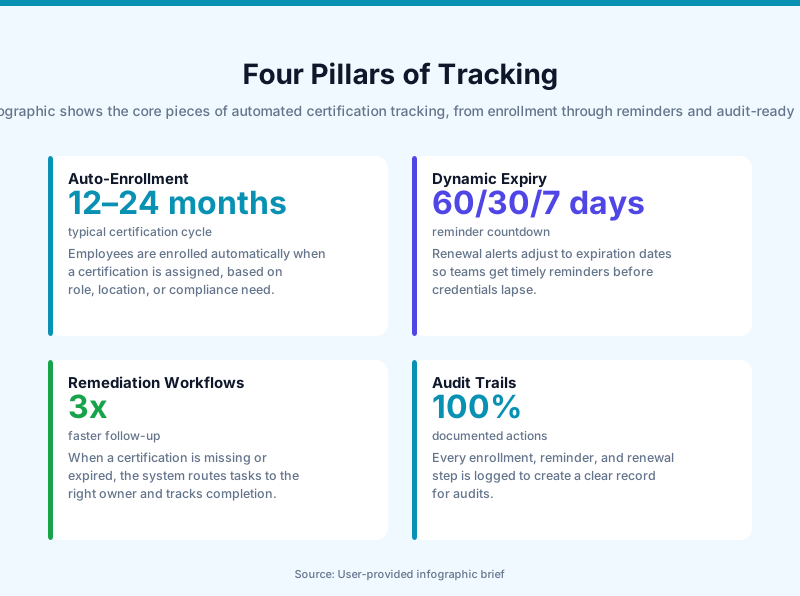
Automation removes spreadsheet risk by tying certifications to roles, events, and system rules instead of manual updates.
Role-based auto-enrollment ensures new hires and promotions instantly receive the right OSHA, GMP, GDPR, or finance tracks.
Dynamic expiry windows calculate recertification deadlines from completion dates, not calendar guesses.
Triggered remediation workflows use escalating reminders and auto-enrollment to prevent lapses before they impact operations.
Centralized audit trails store attempts, scores, signatures, and timestamps as instantly retrievable evidence for regulators.
Platform choice depends on risk profile—GRC suites suit SOX/ISO programs, while validated LMSs fit life sciences and healthcare.
Skill Studio AI turns dense SOPs and Annex 1 guidance into audit-ready video training that plugs into tracking workflows.
Well-defined grace periods and access rules translate policy into system logic that is defensible in audits.
Governance and periodic review keep automation aligned with evolving regulations and org structure changes.
Implementing compliance training with automated certification tracking is one of the fastest ways to reduce audit exposure and administrative overhead in regulated organizations. This article explains how modern LMS and GRC platforms put certification lifecycle management on autopilot and how to design rules that regulators will accept.
Skill Studio AI plays into this picture by converting SOPs, policies, and regulatory guidance into structured, video-based compliance training that feeds directly into automated certification workflows.
What is automated certification tracking in compliance training?
Automated certification tracking is a system-driven approach to assigning, monitoring, renewing, and evidencing mandatory training and credentials without manual spreadsheets or ad hoc reminders.
Instead of HR or QA teams updating trackers, the platform uses data from HRIS, LMS, and sometimes GRC systems to determine who needs what, by when, and whether they are compliant. According to Glean’s 2024 analysis on AI in compliance tracking, companies that adopt AI automation experience about 30% lower compliance costs and 50% faster processing times compared with manual approaches. Modern platforms extend this advantage by combining auto-enrollment, dynamic recertification logic, remediation workflows, and audit-ready reporting. Skill Studio AI focuses on the content side of this equation by turning dense compliance documents into structured, trackable courses that slot into these automated flows.
Why do manual compliance tracking methods fail in high-stakes environments?
Manual compliance tracking fails because it cannot reliably keep pace with organizational changes, regulatory updates, and recertification windows at scale.
In a 5,000-person pharma plant or a multi-country bank, staff join, leave, and change roles every week; trying to keep an Excel matrix updated introduces inevitable delays and errors. Audit findings often trace back to issues like outdated role definitions, missed recertification deadlines, or missing proof of completion despite training being delivered. Glean’s 2024 perspective on AI-enhanced training notes that modern systems monitor completion in real time and predict potential compliance risks—capabilities manual trackers cannot match. For Annex 1-affected manufacturers, these errors can contribute to FDA 483 observations or EU GMP findings that cost hundreds of thousands of dollars in remediation. Skill Studio AI is typically introduced after such events, when sites need to demonstrate that previously ad hoc SOP training is now standardized, version-controlled, and fully tracked.
How do role-based auto-enrollment rules work?
Role-based auto-enrollment assigns the right training and certifications automatically based on attributes like job role, department, location, and risk profile pulled from your HRIS.
The LMS or GRC tool integrates with the HR Information System via API and listens for events such as “new hire,” “role change,” or “location change.” For example, when an operator is promoted to “Production Supervisor,” the system detects the new role and immediately enrolls them into the supervisor compliance track—perhaps OSHA supervisory modules, site-specific GMP, and data integrity training. According to Docebo’s 2025 guidance on automating compliance training, tying enrollment to HR events is one of the core steps to removing administrative friction.
These rules can stack: a user in “QC Analyst” + “Dublin” + “Sterile Manufacturing” might be mapped to Annex 1 aseptic qualification, data integrity, and site health and safety courses. Skill Studio AI supports this model by generating role-specific variants of the same SOP training—for example, separate modules for operators, supervisors, and QA reviewers—so auto-enrollment can assign the most relevant version to each audience.
How do dynamic expiry and recertification rules operate?
Dynamic expiry and recertification rules compute certification validity from completion dates and trigger renewal workflows automatically before credentials lapse.
Instead of a static calendar, the system stores a “validity window” such as 12, 24, or 36 months for each course or credential. When a learner completes training, the platform timestamps the event and calculates the expiration date forward. Valamis and other LMS vendors describe this pattern as core to modern certification management: validity windows plus automated recalculation on completion. This is crucial in contexts like annual GMP refreshers, biennial HIPAA training, or periodic safety drills.
The rules can also support different validity windows by risk: for instance, sterile area gowning might require 6‑month requalification, whereas general data privacy awareness might be every 24 months. AI-enabled tools go further by analyzing completion patterns to flag teams or locations that systematically complete late, allowing targeted interventions. Skill Studio AI complements this by ensuring updated SOP revisions automatically generate new module versions, so recertification is always tied to the latest controlled document rather than outdated content.
What are triggered remediation workflows in certification tracking?
Triggered remediation workflows are automated actions—reminders, escalations, and re-enrollments—that fire when certifications are approaching expiry or already non-compliant.
Instead of HR staff monitoring spreadsheets, the system sends email or SMS reminders at predefined thresholds such as 60, 30, and 7 days before expiration. If completion still does not occur, the platform can automatically re-enroll the learner in a refresher course, notify their manager, or escalate to QA or Compliance. Many organizations also link these workflows to system access controls so that, after a defined grace period, non-compliant users lose access to production environments, trading systems, or specific applications until training is completed.
According to TechClass’s 2024 article on AI in corporate compliance audits, AI-based systems provide real-time monitoring and automated alerts that reduce manual follow-up and strengthen evidence chains. In high-risk sites, these workflows are often configured with multiple tiers—e.g., employee reminders at 60/30/7 days, manager escalation at -1 day, QA escalation at +7 days. Skill Studio AI’s audit-ready content structure supports these flows because each course completion, quiz score, and attestation is captured in a way that downstream LMS or GRC tools can use as the trigger for remediation rules.
How do audit trails make compliance training audit-ready?
Audit trails make training audit-ready by providing a complete, time-stamped record of who did what, when, and under which approved document version.
A robust audit trail typically records course assignments, launch attempts, completion status, quiz scores, time spent in content, acknowledgements of policies, and electronic signatures where required. Glean’s 2024 perspective highlights that AI systems can provide comprehensive analytics for audits, reducing the need for manual documentation. In some financial compliance contexts, providers combine this with blockchain-style immutable logs for maximum traceability, as described in Outscale’s 2023 discussion of immutable audit trails.
For regulated manufacturing, the key is that an auditor can ask, “Show me evidence that all Sterile Fill Line operators were trained on the Annex 1 revision effective March 2024,” and the system can produce a filtered report within seconds. Skill Studio AI is designed for this standard: it maintains version control over SOP-based training modules, enabling LMS or quality systems to present clean, version-accurate training evidence during inspections. Full 21 CFR Part 11 alignment for electronic records, including e-signatures and immutable audit logs, is on our roadmap and not yet shipped.
Which platform types support automated compliance tracking?
Automated compliance tracking is typically delivered either through advanced LMS platforms, specialist validated LMSs for regulated sectors, or GRC suites with built-in control evidence tracking.
Different solutions fit different risk profiles and organizational sizes. The table below summarizes common patterns, anchored in vendor capabilities described in public resources from platforms such as Absorb LMS, Dokeos, TalentLMS, iSpring Learn, SAP Litmos, and AuditBoard.
Platform type | Typical vendors | Best for | Key automation strengths | Limitations |
|---|---|---|---|---|
Enterprise LMS with certification engines | Absorb LMS, 360Learning | Large organizations needing scalable portals and deep certification workflows | Advanced role rules, multi-portal support, complex recertification logic, robust reporting | Configuration complexity, may require professional services and long rollouts |
Validated compliance-first LMS | Dokeos and similar pharma/healthcare-focused LMSs | Life sciences, pharma, healthcare where validation and data integrity are critical | 21 CFR Part 11 features, controlled e-signatures, validation documentation, strong audit trails | Less flexible for non-regulated use cases; higher governance overhead |
Mid-market LMS | TalentLMS, Valamis, iSpring Learn, SAP Litmos | Mid-sized companies wanting fast deployment and solid certification tracking | Quick setup, standard auto-enrollment, reminders, transcript exports | May not meet all validation expectations for highly regulated industries |
GRC / audit platforms | AuditBoard, ComplyScore | Organizations focused on SOX, ISO 27001, HIPAA, enterprise risk management | Automated evidence collection, control testing, mapping training to controls | Often rely on integration with LMS for delivery and learner experience |
Skill Studio AI typically sits alongside these platforms rather than replacing them, generating SOP-based training and video modules that plug into any LMS or GRC workflow as tracked items, especially in pharma, healthcare, and financial services where content quality and traceability are under scrutiny.
How does Skill Studio AI fit into automated compliance tracking?
Skill Studio AI fits into automated compliance tracking by solving the content bottleneck—turning controlled documents into structured, versioned training objects that LMS and GRC platforms can track with precision.
For Heads of QA and Site Directors, the immediate challenge after an FDA 483 or Annex 1 gap is not just “track training better,” but “rapidly create risk-focused training aligned to updated SOPs and CAPAs.” Skill Studio AI ingests SOPs, CAPA plans, and policy documents and produces audit-ready video training in minutes, with role-targeted versions. This content is then surfaced as assignable courses in existing compliance LMSs like ComplianceWire or Veeva Vault Training.
Because Skill Studio AI supports version control, each new SOP revision generates a new course version that downstream systems can link to specific completion evidence. 21 CFR Part 11-aligned electronic recordkeeping is on our roadmap and not yet shipped. This closes a common audit gap where learners are recorded as “trained” but on an earlier SOP version. For pharma services consultancies, Skill Studio AI also enables cloning an SME’s teaching style to scale consistent, high-quality content into client LMSs without repeated live delivery.
What are best practices for implementing automated tracking?
The best implementations treat automated tracking as an extension of written policy and risk assessment, not just an IT project.
Start by mapping regulatory frameworks (e.g., OSHA, HIPAA, GMP, SOC 2) to roles, sites, and systems, then convert that model into enrollment rules and certification templates. Docebo’s 2025 recommendations for automation highlight defining clear warning windows and grace periods early—for instance, 60/30/7‑day reminders, a 7‑day grace period after expiry, and then automatic system access suspension until completion. This logic should be documented in SOPs and risk assessments to be defensible during audits.
Content quality is equally important. Automation that assigns outdated or generic training does not reduce risk. Skill Studio AI addresses this by quickly turning updated SOPs and Annex 1 guidance into concise, role-tailored modules, which can then be linked to your certification templates. Finally, pilot with a high-risk area—such as sterile manufacturing, trading desks, or patient data access—measure late completion rates and audit observations before and after, and then scale the approach across the enterprise.
How should regulated firms approach change management and governance?
Regulated firms should approach automated certification tracking with formal governance, periodic review, and close collaboration between QA, HR, IT, and business owners.
Outscale’s 2023 guidance on AI for compliance stresses the importance of data governance, explainability, and hybrid human–AI workflows. Applied to training, this means having clear owners for: role definitions and mappings; certification template design; policy on grace periods and access restrictions; and periodic audits of training data quality. Quarterly or semi-annual reviews should compare the LMS/GRC configuration against current org charts, SOP inventories, and regulatory requirements to catch drift.
Engaging regulators or external auditors early—especially in heavily scrutinized sectors—can help validate that your automated rules align with expectations. For pharma and medical device sites, this might involve documenting Skill Studio AI’s role in content generation and change control as part of your quality management system, and ensuring your validated LMS or quality system is the system of record for completions. Training end-users on what the reminders mean, what happens when they ignore them, and how to access assigned content is also essential for avoiding surprise lockouts and operational disruption.
Frequently Asked Questions
What is automated certification tracking in a compliance LMS?
Automated certification tracking is the use of system rules to assign, monitor, renew, and document mandatory training without manual spreadsheets. The LMS or GRC tool ties training requirements to roles and events, calculates expiry dates, sends reminders, and logs completions with timestamps and scores. Skill Studio AI feeds such systems with structured, version-controlled training content derived from SOPs and policies.
How does role-based auto-enrollment reduce compliance risk?
Role-based auto-enrollment reduces risk by ensuring staff are automatically assigned the correct training as soon as they join or change positions. The platform reads role and department data from the HRIS and assigns certifications for frameworks like OSHA, HIPAA, Annex 1, or SOX. This removes delays caused by manual updates and closes gaps where employees perform tasks without appropriate training.
What evidence do auditors expect from automated tracking systems?
Auditors typically expect to see a complete audit trail showing who was assigned which training, when they completed it, their scores, and which document version the training referenced. They also look for clear rules around recertification cycles, reminders, and escalation paths. Systems aligned with 21 CFR Part 11 and similar standards provide electronic records and signatures that meet these expectations.
Can automated certification tracking integrate with existing HR and GRC tools?
Yes, most modern LMS and GRC platforms integrate with HR Information Systems and other enterprise tools through APIs or standardized connectors. This allows them to react to events like new hires and role changes and to feed training evidence into wider control frameworks. Skill Studio AI is typically integrated via the LMS or quality system layer, supplying compliant training objects rather than replacing core HR or GRC infrastructure.
How should we set grace periods and access rules for expired training?
Grace periods and access rules should be based on risk assessments and documented policy. Many organizations use escalating reminders at 60, 30, and 7 days before expiry, followed by a short grace period during which managers are notified. After that, system access or specific privileges may be suspended until training is completed. These rules must be transparent to staff and consistently enforced.
Where does Skill Studio AI sit in an automated compliance architecture?
Skill Studio AI typically sits upstream of the LMS or GRC system as a content engine. It converts SOPs, CAPAs, and regulatory documents into structured, audit-ready video modules, with version control. 21 CFR Part 11 alignment is on our roadmap and not yet shipped. Those modules are then distributed via existing platforms like ComplianceWire, Veeva Vault Training, or enterprise LMSs that handle enrollment, tracking, and reporting.
Automated certification tracking turns compliance training from spreadsheet chaos into defensible, audit-ready evidence that runs itself.
Last updated: May 2026
Contents
Key Takeaways
What is automated certification tracking in compliance training?
Why do manual compliance tracking methods fail in high-stakes environments?
How do role-based auto-enrollment rules work?
How do dynamic expiry and recertification rules operate?
What are triggered remediation workflows in certification tracking?
How do audit trails make compliance training audit-ready?
Which platform types support automated compliance tracking?
How does Skill Studio AI fit into automated compliance tracking?
What are best practices for implementing automated tracking?
How should regulated firms approach change management and governance?
Frequently Asked Questions
Key Takeaways
Automation removes spreadsheet risk by tying certifications to roles, events, and system rules instead of manual updates.
Role-based auto-enrollment ensures new hires and promotions instantly receive the right OSHA, GMP, GDPR, or finance tracks.
Dynamic expiry windows calculate recertification deadlines from completion dates, not calendar guesses.
Triggered remediation workflows use escalating reminders and auto-enrollment to prevent lapses before they impact operations.
Centralized audit trails store attempts, scores, signatures, and timestamps as instantly retrievable evidence for regulators.
Platform choice depends on risk profile—GRC suites suit SOX/ISO programs, while validated LMSs fit life sciences and healthcare.
Skill Studio AI turns dense SOPs and Annex 1 guidance into audit-ready video training that plugs into tracking workflows.
Well-defined grace periods and access rules translate policy into system logic that is defensible in audits.
Governance and periodic review keep automation aligned with evolving regulations and org structure changes.
Implementing compliance training with automated certification tracking is one of the fastest ways to reduce audit exposure and administrative overhead in regulated organizations. This article explains how modern LMS and GRC platforms put certification lifecycle management on autopilot and how to design rules that regulators will accept.
Skill Studio AI plays into this picture by converting SOPs, policies, and regulatory guidance into structured, video-based compliance training that feeds directly into automated certification workflows.
What is automated certification tracking in compliance training?
Automated certification tracking is a system-driven approach to assigning, monitoring, renewing, and evidencing mandatory training and credentials without manual spreadsheets or ad hoc reminders.
Instead of HR or QA teams updating trackers, the platform uses data from HRIS, LMS, and sometimes GRC systems to determine who needs what, by when, and whether they are compliant. According to Glean’s 2024 analysis on AI in compliance tracking, companies that adopt AI automation experience about 30% lower compliance costs and 50% faster processing times compared with manual approaches. Modern platforms extend this advantage by combining auto-enrollment, dynamic recertification logic, remediation workflows, and audit-ready reporting. Skill Studio AI focuses on the content side of this equation by turning dense compliance documents into structured, trackable courses that slot into these automated flows.
Why do manual compliance tracking methods fail in high-stakes environments?
Manual compliance tracking fails because it cannot reliably keep pace with organizational changes, regulatory updates, and recertification windows at scale.
In a 5,000-person pharma plant or a multi-country bank, staff join, leave, and change roles every week; trying to keep an Excel matrix updated introduces inevitable delays and errors. Audit findings often trace back to issues like outdated role definitions, missed recertification deadlines, or missing proof of completion despite training being delivered. Glean’s 2024 perspective on AI-enhanced training notes that modern systems monitor completion in real time and predict potential compliance risks—capabilities manual trackers cannot match. For Annex 1-affected manufacturers, these errors can contribute to FDA 483 observations or EU GMP findings that cost hundreds of thousands of dollars in remediation. Skill Studio AI is typically introduced after such events, when sites need to demonstrate that previously ad hoc SOP training is now standardized, version-controlled, and fully tracked.
How do role-based auto-enrollment rules work?
Role-based auto-enrollment assigns the right training and certifications automatically based on attributes like job role, department, location, and risk profile pulled from your HRIS.
The LMS or GRC tool integrates with the HR Information System via API and listens for events such as “new hire,” “role change,” or “location change.” For example, when an operator is promoted to “Production Supervisor,” the system detects the new role and immediately enrolls them into the supervisor compliance track—perhaps OSHA supervisory modules, site-specific GMP, and data integrity training. According to Docebo’s 2025 guidance on automating compliance training, tying enrollment to HR events is one of the core steps to removing administrative friction.
These rules can stack: a user in “QC Analyst” + “Dublin” + “Sterile Manufacturing” might be mapped to Annex 1 aseptic qualification, data integrity, and site health and safety courses. Skill Studio AI supports this model by generating role-specific variants of the same SOP training—for example, separate modules for operators, supervisors, and QA reviewers—so auto-enrollment can assign the most relevant version to each audience.
How do dynamic expiry and recertification rules operate?
Dynamic expiry and recertification rules compute certification validity from completion dates and trigger renewal workflows automatically before credentials lapse.
Instead of a static calendar, the system stores a “validity window” such as 12, 24, or 36 months for each course or credential. When a learner completes training, the platform timestamps the event and calculates the expiration date forward. Valamis and other LMS vendors describe this pattern as core to modern certification management: validity windows plus automated recalculation on completion. This is crucial in contexts like annual GMP refreshers, biennial HIPAA training, or periodic safety drills.
The rules can also support different validity windows by risk: for instance, sterile area gowning might require 6‑month requalification, whereas general data privacy awareness might be every 24 months. AI-enabled tools go further by analyzing completion patterns to flag teams or locations that systematically complete late, allowing targeted interventions. Skill Studio AI complements this by ensuring updated SOP revisions automatically generate new module versions, so recertification is always tied to the latest controlled document rather than outdated content.
What are triggered remediation workflows in certification tracking?
Triggered remediation workflows are automated actions—reminders, escalations, and re-enrollments—that fire when certifications are approaching expiry or already non-compliant.
Instead of HR staff monitoring spreadsheets, the system sends email or SMS reminders at predefined thresholds such as 60, 30, and 7 days before expiration. If completion still does not occur, the platform can automatically re-enroll the learner in a refresher course, notify their manager, or escalate to QA or Compliance. Many organizations also link these workflows to system access controls so that, after a defined grace period, non-compliant users lose access to production environments, trading systems, or specific applications until training is completed.
According to TechClass’s 2024 article on AI in corporate compliance audits, AI-based systems provide real-time monitoring and automated alerts that reduce manual follow-up and strengthen evidence chains. In high-risk sites, these workflows are often configured with multiple tiers—e.g., employee reminders at 60/30/7 days, manager escalation at -1 day, QA escalation at +7 days. Skill Studio AI’s audit-ready content structure supports these flows because each course completion, quiz score, and attestation is captured in a way that downstream LMS or GRC tools can use as the trigger for remediation rules.
How do audit trails make compliance training audit-ready?
Audit trails make training audit-ready by providing a complete, time-stamped record of who did what, when, and under which approved document version.
A robust audit trail typically records course assignments, launch attempts, completion status, quiz scores, time spent in content, acknowledgements of policies, and electronic signatures where required. Glean’s 2024 perspective highlights that AI systems can provide comprehensive analytics for audits, reducing the need for manual documentation. In some financial compliance contexts, providers combine this with blockchain-style immutable logs for maximum traceability, as described in Outscale’s 2023 discussion of immutable audit trails.
For regulated manufacturing, the key is that an auditor can ask, “Show me evidence that all Sterile Fill Line operators were trained on the Annex 1 revision effective March 2024,” and the system can produce a filtered report within seconds. Skill Studio AI is designed for this standard: it maintains version control over SOP-based training modules, enabling LMS or quality systems to present clean, version-accurate training evidence during inspections. Full 21 CFR Part 11 alignment for electronic records, including e-signatures and immutable audit logs, is on our roadmap and not yet shipped.
Which platform types support automated compliance tracking?
Automated compliance tracking is typically delivered either through advanced LMS platforms, specialist validated LMSs for regulated sectors, or GRC suites with built-in control evidence tracking.
Different solutions fit different risk profiles and organizational sizes. The table below summarizes common patterns, anchored in vendor capabilities described in public resources from platforms such as Absorb LMS, Dokeos, TalentLMS, iSpring Learn, SAP Litmos, and AuditBoard.
Platform type | Typical vendors | Best for | Key automation strengths | Limitations |
|---|---|---|---|---|
Enterprise LMS with certification engines | Absorb LMS, 360Learning | Large organizations needing scalable portals and deep certification workflows | Advanced role rules, multi-portal support, complex recertification logic, robust reporting | Configuration complexity, may require professional services and long rollouts |
Validated compliance-first LMS | Dokeos and similar pharma/healthcare-focused LMSs | Life sciences, pharma, healthcare where validation and data integrity are critical | 21 CFR Part 11 features, controlled e-signatures, validation documentation, strong audit trails | Less flexible for non-regulated use cases; higher governance overhead |
Mid-market LMS | TalentLMS, Valamis, iSpring Learn, SAP Litmos | Mid-sized companies wanting fast deployment and solid certification tracking | Quick setup, standard auto-enrollment, reminders, transcript exports | May not meet all validation expectations for highly regulated industries |
GRC / audit platforms | AuditBoard, ComplyScore | Organizations focused on SOX, ISO 27001, HIPAA, enterprise risk management | Automated evidence collection, control testing, mapping training to controls | Often rely on integration with LMS for delivery and learner experience |
Skill Studio AI typically sits alongside these platforms rather than replacing them, generating SOP-based training and video modules that plug into any LMS or GRC workflow as tracked items, especially in pharma, healthcare, and financial services where content quality and traceability are under scrutiny.
How does Skill Studio AI fit into automated compliance tracking?
Skill Studio AI fits into automated compliance tracking by solving the content bottleneck—turning controlled documents into structured, versioned training objects that LMS and GRC platforms can track with precision.
For Heads of QA and Site Directors, the immediate challenge after an FDA 483 or Annex 1 gap is not just “track training better,” but “rapidly create risk-focused training aligned to updated SOPs and CAPAs.” Skill Studio AI ingests SOPs, CAPA plans, and policy documents and produces audit-ready video training in minutes, with role-targeted versions. This content is then surfaced as assignable courses in existing compliance LMSs like ComplianceWire or Veeva Vault Training.
Because Skill Studio AI supports version control, each new SOP revision generates a new course version that downstream systems can link to specific completion evidence. 21 CFR Part 11-aligned electronic recordkeeping is on our roadmap and not yet shipped. This closes a common audit gap where learners are recorded as “trained” but on an earlier SOP version. For pharma services consultancies, Skill Studio AI also enables cloning an SME’s teaching style to scale consistent, high-quality content into client LMSs without repeated live delivery.
What are best practices for implementing automated tracking?
The best implementations treat automated tracking as an extension of written policy and risk assessment, not just an IT project.
Start by mapping regulatory frameworks (e.g., OSHA, HIPAA, GMP, SOC 2) to roles, sites, and systems, then convert that model into enrollment rules and certification templates. Docebo’s 2025 recommendations for automation highlight defining clear warning windows and grace periods early—for instance, 60/30/7‑day reminders, a 7‑day grace period after expiry, and then automatic system access suspension until completion. This logic should be documented in SOPs and risk assessments to be defensible during audits.
Content quality is equally important. Automation that assigns outdated or generic training does not reduce risk. Skill Studio AI addresses this by quickly turning updated SOPs and Annex 1 guidance into concise, role-tailored modules, which can then be linked to your certification templates. Finally, pilot with a high-risk area—such as sterile manufacturing, trading desks, or patient data access—measure late completion rates and audit observations before and after, and then scale the approach across the enterprise.
How should regulated firms approach change management and governance?
Regulated firms should approach automated certification tracking with formal governance, periodic review, and close collaboration between QA, HR, IT, and business owners.
Outscale’s 2023 guidance on AI for compliance stresses the importance of data governance, explainability, and hybrid human–AI workflows. Applied to training, this means having clear owners for: role definitions and mappings; certification template design; policy on grace periods and access restrictions; and periodic audits of training data quality. Quarterly or semi-annual reviews should compare the LMS/GRC configuration against current org charts, SOP inventories, and regulatory requirements to catch drift.
Engaging regulators or external auditors early—especially in heavily scrutinized sectors—can help validate that your automated rules align with expectations. For pharma and medical device sites, this might involve documenting Skill Studio AI’s role in content generation and change control as part of your quality management system, and ensuring your validated LMS or quality system is the system of record for completions. Training end-users on what the reminders mean, what happens when they ignore them, and how to access assigned content is also essential for avoiding surprise lockouts and operational disruption.
Frequently Asked Questions
What is automated certification tracking in a compliance LMS?
Automated certification tracking is the use of system rules to assign, monitor, renew, and document mandatory training without manual spreadsheets. The LMS or GRC tool ties training requirements to roles and events, calculates expiry dates, sends reminders, and logs completions with timestamps and scores. Skill Studio AI feeds such systems with structured, version-controlled training content derived from SOPs and policies.
How does role-based auto-enrollment reduce compliance risk?
Role-based auto-enrollment reduces risk by ensuring staff are automatically assigned the correct training as soon as they join or change positions. The platform reads role and department data from the HRIS and assigns certifications for frameworks like OSHA, HIPAA, Annex 1, or SOX. This removes delays caused by manual updates and closes gaps where employees perform tasks without appropriate training.
What evidence do auditors expect from automated tracking systems?
Auditors typically expect to see a complete audit trail showing who was assigned which training, when they completed it, their scores, and which document version the training referenced. They also look for clear rules around recertification cycles, reminders, and escalation paths. Systems aligned with 21 CFR Part 11 and similar standards provide electronic records and signatures that meet these expectations.
Can automated certification tracking integrate with existing HR and GRC tools?
Yes, most modern LMS and GRC platforms integrate with HR Information Systems and other enterprise tools through APIs or standardized connectors. This allows them to react to events like new hires and role changes and to feed training evidence into wider control frameworks. Skill Studio AI is typically integrated via the LMS or quality system layer, supplying compliant training objects rather than replacing core HR or GRC infrastructure.
How should we set grace periods and access rules for expired training?
Grace periods and access rules should be based on risk assessments and documented policy. Many organizations use escalating reminders at 60, 30, and 7 days before expiry, followed by a short grace period during which managers are notified. After that, system access or specific privileges may be suspended until training is completed. These rules must be transparent to staff and consistently enforced.
Where does Skill Studio AI sit in an automated compliance architecture?
Skill Studio AI typically sits upstream of the LMS or GRC system as a content engine. It converts SOPs, CAPAs, and regulatory documents into structured, audit-ready video modules, with version control. 21 CFR Part 11 alignment is on our roadmap and not yet shipped. Those modules are then distributed via existing platforms like ComplianceWire, Veeva Vault Training, or enterprise LMSs that handle enrollment, tracking, and reporting.
Related Articles You May Enjoy



See How AI Revolutionizes Compliance Training —
Book Your Free Demo
Instantly create audit-ready fintech and healthcare training videos. Save weeks of manual work and cut costs by 90%.
Trusted by global customers and partners
See How AI Revolutionizes Compliance Training —
Book Your Free Demo
Instantly create audit-ready fintech and healthcare training videos. Save weeks of manual work and cut costs by 90%.
Trusted by global customers and partners
See How AI Revolutionizes Compliance Training —
Book Your Free Demo
Instantly create audit-ready fintech and healthcare training videos. Save weeks of manual work and cut costs by 90%.
Trusted by global customers and partners


Ready to transform your compliance training?
Join the regulated firms across the UK and Ireland that are creating professional training content 95% faster with AI. Start your free trial today — no credit card required.


Products
Solutions
©2026 Skill Studio AI · All rights reserved.
Ready to transform your compliance training?
Join the regulated firms across the UK and Ireland that are creating professional training content 95% faster with AI. Start your free trial today — no credit card required.
Products
Solutions
©2026 Skill Studio AI · All rights reserved.
Ready to transform your compliance training?
Join the regulated firms across the UK and Ireland that are creating professional training content 95% faster with AI. Start your free trial today — no credit card required.
Products
Solutions
©2026 Skill Studio AI · All rights reserved.
Ready to transform your compliance training?
Join the regulated firms across the UK and Ireland that are creating professional training content 95% faster with AI. Start your free trial today — no credit card required.
Products
Solutions
©2026 Skill Studio AI · All rights reserved.