
industry-news
industry-news
Convert Webinars into Online Learning: Maximizing Engagement and Accessibility
Convert Webinars into Online Learning: Maximizing Engagement and Accessibility
How to turn webinars into accessible, high-impact, compliance-ready online courses.
How to turn webinars into accessible, high-impact, compliance-ready online courses.


Go back
Search All News …

Webinars are a great start, but converting them into structured online learning is how you get real engagement, accessibility, and long-term value.
Last updated: May 2026
Contents
Key Takeaways

What does it mean to convert webinars into online learning?
Why are webinars alone no longer enough?
How do you structure a course from a webinar recording?
How do you make converted webinars more accessible?
How do you increase engagement and retention?
How do you handle updates, version control, and compliance?
How can AI tools like Skill Studio AI speed up webinar conversion?
What does a webinar‑to‑course conversion workflow look like?
Frequently Asked Questions
Key Takeaways
Webinars are a starting point but hour‑long recordings alone rarely deliver sustained engagement, accessibility, or assessment.
Asynchronous online courses built from webinars give learners control over pace, timing, and device, increasing flexibility and reach.
Accessibility must be intentional, following standards such as WCAG, Section 508, and ADA with captions, transcripts, and clear structure.
Chunking and interaction (short modules, quizzes, scenarios) can significantly boost knowledge retention compared with passive video.
Evergreen design and version control stretch the lifespan of time‑sensitive webinars while keeping regulatory content current.
Analytics close the loop by showing where learners struggle so you can refine content and improve completion and pass rates over time.
Skill Studio AI exemplifies this shift by turning dense SOPs and recorded knowledge into audit‑ready, video‑based training in minutes.
Regulated industries benefit most, where consistent, documented, and accessible training is central to audits, CAPAs, and Annex 1 expectations.
For a lot of teams, webinars were the emergency bridge into online learning—especially during COVID—so now you’re sitting on a big library of recordings that are “better than nothing” but not really working. This article walks through how to turn those webinars into proper online courses that are more engaging, more accessible, and far easier to maintain over time, with examples from regulated industries and practical design steps you can follow.
What does it mean to convert webinars into online learning?
Converting webinars into online learning means transforming live or recorded webinar sessions into structured, asynchronous courses with clear outcomes, interactions, accessibility features, and analytics—not just uploading the raw video.
The original webinar is just one content source: a long, linear story with no built‑in checks, minimal structure, and lots of “live” filler. To make it an online course, you break that story into modules, define learning objectives for each, design short activities and assessments, and support it with text, visuals, and downloadable resources. According to the article “Convert Webinars into Online Learning: Maximizing Engagement and Accessibility,” this shift from time‑bound webinar to on‑demand, self‑paced course better aligns with adult learners’ need for flexibility and control.
In regulated industries, that conversion also needs documentation and traceability—who took which version of which training, and when. Skill Studio AI is built for exactly this scenario: it takes dense SOPs, compliance documents, and procedural manuals and turns them into audit‑ready video training with role‑targeted delivery and version control, so your webinar‑based courses can slot into an existing quality system rather than sit on an island.
Why are webinars alone no longer enough?
Webinars alone are no longer enough because they’re time‑bound, largely passive, and usually inaccessible to learners who need flexibility, interactivity, and support for different abilities and bandwidth constraints.
As Dr. Diana Brandon notes, many organizations now have a catalog of hour‑long webinar recordings that “aren’t effectively meeting current learning needs” and “lack engagement” or assessment opportunities. Learners can press play and tune out, and people with visual or auditory impairments often get little or no accommodation beyond auto‑captions. On top of that, information dates quickly—especially in regulated fields—so a static recording becomes a compliance risk if it contradicts your current SOPs.
To meet demand for flexible, scalable training, Brandon argues for converting webinars into asynchronous courses where learners control pace and timing, which is critical when 74% of adult learners rate flexible scheduling as a key decision factor for online programs (Bates, 2020). Skill Studio AI leans into this by turning static content into modular training that can be accessed on demand and across roles, rather than forcing everyone into a single scheduled session (multilingual access is on the roadmap).
How do you structure a course from a webinar recording?
You structure a course from a webinar recording by chunking the content into short modules, aligning each with a clear objective, and layering in activities, checks for understanding, and supporting resources.
A practical way to start is to scan the agenda or slide deck for natural sections—introduction, key concepts, case examples, Q&A—and map each to a course module. Brandon’s piece highlights how long videos with “no required interaction” are a barrier; breaking a 60‑minute webinar into 5–10 minute segments with an activity after each dramatically changes how learners engage. Research summarised by Clark and Mayer (2016) shows that interactive, self‑paced environments can boost retention by up to 40% compared to purely lecture‑style formats.
In industries like pharma or banking, where you’re often converting subject matter expert sessions, the core facts are there—you just need structure and practice. Skill Studio AI helps here by cloning an SME’s teaching style or avatar and regenerating shorter, focused video segments from dense manuals or existing content, so you don’t need the SME back on Zoom for endless rerecords just to fix sequencing or emphasis.
How should a converted webinar course be organized?
For most professional and compliance topics, a simple, predictable course skeleton works best:
Module 1 – Orientation: Why this matters, what learners will be able to do, how they’ll be assessed.
Modules 2–N – Core content: Each focused on a single cluster of skills or regulations, with 1–2 clear objectives.
Within each module: Short video segment from the original webinar, a concise text summary, 3–5 quiz questions or a small scenario.
Final module: Cumulative assessment and practical application—case study, checklist, or job aid.
This structure is especially useful in Annex 1‑affected sites, where you might turn a single sterile manufacturing webinar into multiple micro‑modules mapped to specific cleanroom behaviors, environmental monitoring practices, or gowning steps. Skill Studio AI supports this kind of modularization with role‑targeted delivery, so operators see the parts relevant to their tasks, while QA or Site Directors get the broader context.
How do you make converted webinars more accessible?
You make converted webinars more accessible by designing against established accessibility standards from the outset—adding captions and transcripts, ensuring readable structure, and preparing content for assistive technologies.
Accessibility in eLearning is about enabling learners with disabilities to “perceive, understand, navigate, and interact with the content,” as summarized by accessibility experts at WCET. They recommend aligning with Web Content Accessibility Guidelines (WCAG) and legal frameworks like Section 508 and the Americans with Disabilities Act (ADA), which cover text readability, multimedia alternatives, and compatibility with assistive devices such as screen readers.
Key practices include:
Accurate captions and transcripts for every video segment, not just auto‑generated text.
Text alternatives for images and graphics, including charts referenced during the webinar.
Clear heading hierarchy and the use of real HTML headers and lists rather than visual formatting alone.
Readable fonts and contrast so text is easy to see for learners with low vision.
Keyboard‑only navigation and compatibility with screen readers and dictation tools.
WCET emphasizes WCAG’s POUR principles—Perceivable, Operable, Understandable, Robust—as a practical checklist for course accessibility. Skill Studio AI builds toward this by making multimedia training audit‑ready by default, with structured course outputs that can be paired with captions, transcripts, and robust navigation, which is critical when regulators are increasingly scrutinizing access for all staff, not just those on fast connections and perfect hearing.
How do you increase engagement and retention?
You increase engagement and retention by turning passive webinar watching into active learning through interaction, practice, and feedback.
Brandon points out that webinars “do not require active engagement”—learners can hit play and disconnect. Yet Clark and Mayer’s work shows that interactive, self‑paced environments can significantly improve knowledge retention compared with one‑way lectures. The goal of conversion is to insert moments where learners need to think, respond, and apply what they’ve just seen.
Effective tactics include:
Micro‑quizzes after each short video segment.
Scenario‑based questions grounded in real industry contexts (e.g., contamination events, data integrity breaches).
Branching choices where learners pick a response and see consequences.
Downloadable job aids so the course feeds back into daily work.
In fields like law or education, Brandon uses examples such as data privacy case studies or classroom scenarios to illustrate how nuance and practice matter more than a single lecture. For manufacturers under EU GMP Annex 1, this could look like simulated decisions on cleanroom behavior, with instant feedback tied to the relevant SOP or regulatory clause. Skill Studio AI supports this approach by transforming long procedural content into shorter, focused video training segments that can be interleaved with quizzes and case‑based questions inside your existing LMS.
How do you handle updates, version control, and compliance?
You handle updates and compliance by designing courses as modular, version‑controlled assets that can be updated incrementally as regulations or SOPs change.
According to the Association for Talent Development (ATD, 2020), converting live training into on‑demand courses can increase program longevity by around 60%, because you can refresh specific sections instead of rebuilding everything from scratch. Evergreen design—focusing on principles and workflows that stay constant, with small, updatable segments for details—is vital in areas like OSHA compliance, GMP/Annex 1, or data privacy, where the base concepts endure even as specific thresholds, timelines, or forms change.
A practical pattern is:
Core modules that change rarely (principles, roles, system overview).
Update modules that address new regulations, forms, or CAPA learnings.
Release notes inside the course explaining what changed and when.
Skill Studio AI was built with this world in mind: it includes version control so your training content stays aligned with the current SOP, which helps during FDA 483 remediation or EU GMP inspections. Completion and certification tracking for this content run through your existing LMS. Because the training is generated from your underlying SOPs and manuals, updates can propagate quickly instead of waiting months for re‑recorded webinars.
How can AI tools like Skill Studio AI speed up webinar conversion?
AI tools like Skill Studio AI speed up webinar conversion by automating the heavy lifting—chunking content, generating scripts and videos, and aligning outputs with roles, languages, and compliance requirements.
Traditional conversion projects can take weeks of instructional design and production time per webinar: scripting, editing, recording, captioning, and LMS configuration. At the same time, most organizations have dozens or hundreds of recordings, SOPs, and CAPA slide decks that all need to become training. AI‑native platforms compress this cycle dramatically by using your existing documents as the source of truth and generating course media from there.
Skill Studio AI exemplifies this approach for regulated industries by taking dense SOPs, compliance documents, and procedural manuals—the same sources that underpinned your webinar—and turning them into structured, audit‑ready video training in minutes, with role‑based delivery built in; 21 CFR Part 11 compliance and multilingual localization are on the roadmap. Because it can clone an instructor’s style or avatar and enforce an engineering‑grade QC process on every render, you keep the SME’s recognizable presence without dragging them into continuous re‑shoots.
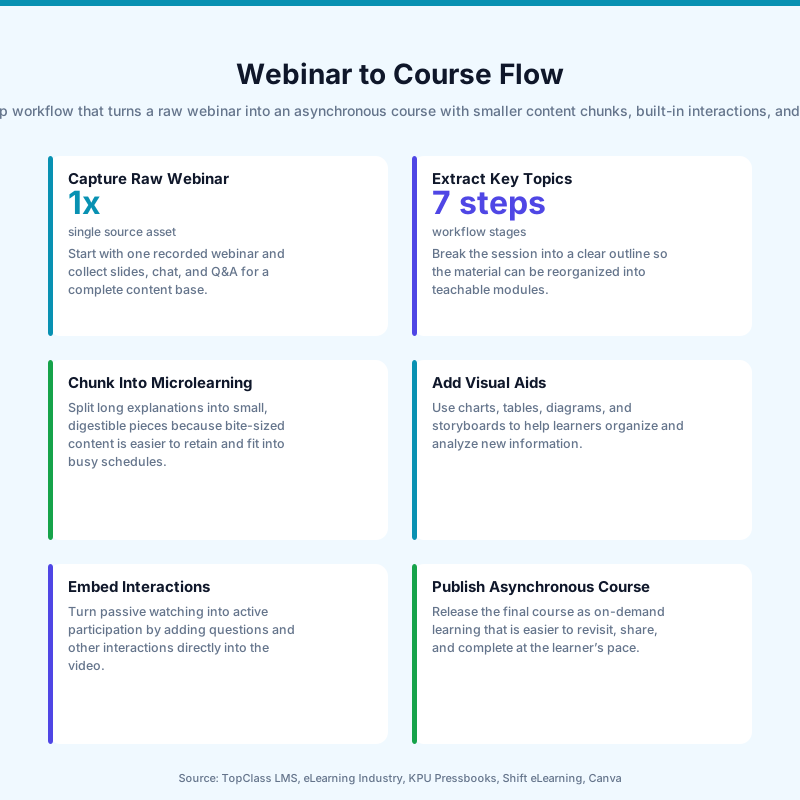
What does a webinar‑to‑course conversion workflow look like?
A practical webinar‑to‑course conversion workflow starts with content triage and ends with analytics‑driven improvement.
Here’s a high‑level, repeatable process you can apply across your webinar library.
Step | Webinar Reality | Converted Course Outcome |
|---|---|---|
1. Triage & selection | Dozens of recordings, mixed quality and relevance. | Shortlist of high‑value topics aligned to current SOPs and KPIs. |
2. Deconstruct & map | 60+ minutes of continuous talk with slides. | Modules mapped to learning objectives and target roles. |
3. Script & chunk | Long narrative, many tangents and Q&A asides. | 5–10 minute segments tied to specific outcomes and knowledge checks. |
4. Produce media | Single, unedited video recording. | Multiple short videos with accurate captions, transcripts, and visuals. |
5. Add interaction | One‑off live Q&A, not repeatable. | Quizzes, scenarios, and downloadable job aids embedded in the LMS. |
6. Release & track | Attendance report, maybe a recording link. | Completion, scores, time‑on‑task, and attempt data for each learner. |
7. Iterate | New webinar every time something changes. | Modular updates and versioning based on analytics and audit feedback. |
At the analytics stage, Brandon notes that asynchronous courses allow you to capture data such as completion rates, quiz scores, and time spent in specific sections, and cites research from West (2019) suggesting that data‑informed design can increase effectiveness by up to 30%. Skill Studio AI supports this iterative loop by feeding structured, role‑targeted courses into LMSs commonly used in pharma and banking (like Veeva Vault Training or ComplianceWire), where that data is already part of your quality reporting.
Frequently Asked Questions
Why should I convert old webinars instead of just recording new ones?
Converting old webinars leverages content you’ve already paid for—SME time, slide development, and real‑world examples—while fixing the flaws that make webinars hard to reuse, like length, passivity, and inconsistent quality. By turning them into structured, asynchronous courses, you gain flexibility, accessibility, assessments, and analytics without starting from scratch each time.
How long should each module be when converting a webinar?
A good rule of thumb is 5–10 minutes of focused content per module segment, each tied to a single learning objective. That length balances cognitive load with practical constraints like bandwidth and shift schedules, especially in sectors such as healthcare or manufacturing where learners may only have short windows between tasks.
How do I keep converted webinar courses compliant with changing regulations?
Design your course so regulatory details live in discrete, easily updated sections, while core principles stay stable across versions. Maintain version control, archive older variants, and document what changed, when, and why—then ensure your LMS can show which learners took which version — Skill Studio AI supports this by keeping the underlying training content itself under version control.
What accessibility features are essential for converted webinar courses?
At minimum, include accurate captions, transcripts, clear headings, keyboard‑friendly navigation, and sufficient color contrast for all text and graphics. Aligning with standards like WCAG, Section 508, and ADA helps ensure learners with visual, auditory, cognitive, or motor disabilities can perceive, understand, and interact with your content across different devices and assistive technologies.
Can a tool like Skill Studio AI replace an instructional designer?
Skill Studio AI accelerates production by turning dense SOPs and existing materials into structured, video‑based training, but it doesn’t remove the need for human judgment about objectives, context, and culture. In practice, L&D teams and QA leaders get more leverage: they spend their time on deciding what to teach and how it fits into a learning strategy, while letting the platform handle rendering and version control (localization is on the roadmap).
What metrics should I track after converting webinars into courses?
Start with completion rates, quiz scores, and time spent in each module to spot drop‑off points and content that confuses learners. In regulated environments, also track training currency (who is up to date on which SOP or Annex 1 module) and link course outcomes to operational metrics like deviation rates, audit findings, or CAPA recurrence to show training impact.
Webinars are a great start, but converting them into structured online learning is how you get real engagement, accessibility, and long-term value.
Last updated: May 2026
Contents
Key Takeaways
What does it mean to convert webinars into online learning?
Why are webinars alone no longer enough?
How do you structure a course from a webinar recording?
How do you make converted webinars more accessible?
How do you increase engagement and retention?
How do you handle updates, version control, and compliance?
How can AI tools like Skill Studio AI speed up webinar conversion?
What does a webinar‑to‑course conversion workflow look like?
Frequently Asked Questions
Key Takeaways
Webinars are a starting point but hour‑long recordings alone rarely deliver sustained engagement, accessibility, or assessment.
Asynchronous online courses built from webinars give learners control over pace, timing, and device, increasing flexibility and reach.
Accessibility must be intentional, following standards such as WCAG, Section 508, and ADA with captions, transcripts, and clear structure.
Chunking and interaction (short modules, quizzes, scenarios) can significantly boost knowledge retention compared with passive video.
Evergreen design and version control stretch the lifespan of time‑sensitive webinars while keeping regulatory content current.
Analytics close the loop by showing where learners struggle so you can refine content and improve completion and pass rates over time.
Skill Studio AI exemplifies this shift by turning dense SOPs and recorded knowledge into audit‑ready, video‑based training in minutes.
Regulated industries benefit most, where consistent, documented, and accessible training is central to audits, CAPAs, and Annex 1 expectations.
For a lot of teams, webinars were the emergency bridge into online learning—especially during COVID—so now you’re sitting on a big library of recordings that are “better than nothing” but not really working. This article walks through how to turn those webinars into proper online courses that are more engaging, more accessible, and far easier to maintain over time, with examples from regulated industries and practical design steps you can follow.
What does it mean to convert webinars into online learning?
Converting webinars into online learning means transforming live or recorded webinar sessions into structured, asynchronous courses with clear outcomes, interactions, accessibility features, and analytics—not just uploading the raw video.
The original webinar is just one content source: a long, linear story with no built‑in checks, minimal structure, and lots of “live” filler. To make it an online course, you break that story into modules, define learning objectives for each, design short activities and assessments, and support it with text, visuals, and downloadable resources. According to the article “Convert Webinars into Online Learning: Maximizing Engagement and Accessibility,” this shift from time‑bound webinar to on‑demand, self‑paced course better aligns with adult learners’ need for flexibility and control.
In regulated industries, that conversion also needs documentation and traceability—who took which version of which training, and when. Skill Studio AI is built for exactly this scenario: it takes dense SOPs, compliance documents, and procedural manuals and turns them into audit‑ready video training with role‑targeted delivery and version control, so your webinar‑based courses can slot into an existing quality system rather than sit on an island.
Why are webinars alone no longer enough?
Webinars alone are no longer enough because they’re time‑bound, largely passive, and usually inaccessible to learners who need flexibility, interactivity, and support for different abilities and bandwidth constraints.
As Dr. Diana Brandon notes, many organizations now have a catalog of hour‑long webinar recordings that “aren’t effectively meeting current learning needs” and “lack engagement” or assessment opportunities. Learners can press play and tune out, and people with visual or auditory impairments often get little or no accommodation beyond auto‑captions. On top of that, information dates quickly—especially in regulated fields—so a static recording becomes a compliance risk if it contradicts your current SOPs.
To meet demand for flexible, scalable training, Brandon argues for converting webinars into asynchronous courses where learners control pace and timing, which is critical when 74% of adult learners rate flexible scheduling as a key decision factor for online programs (Bates, 2020). Skill Studio AI leans into this by turning static content into modular training that can be accessed on demand and across roles, rather than forcing everyone into a single scheduled session (multilingual access is on the roadmap).
How do you structure a course from a webinar recording?
You structure a course from a webinar recording by chunking the content into short modules, aligning each with a clear objective, and layering in activities, checks for understanding, and supporting resources.
A practical way to start is to scan the agenda or slide deck for natural sections—introduction, key concepts, case examples, Q&A—and map each to a course module. Brandon’s piece highlights how long videos with “no required interaction” are a barrier; breaking a 60‑minute webinar into 5–10 minute segments with an activity after each dramatically changes how learners engage. Research summarised by Clark and Mayer (2016) shows that interactive, self‑paced environments can boost retention by up to 40% compared to purely lecture‑style formats.
In industries like pharma or banking, where you’re often converting subject matter expert sessions, the core facts are there—you just need structure and practice. Skill Studio AI helps here by cloning an SME’s teaching style or avatar and regenerating shorter, focused video segments from dense manuals or existing content, so you don’t need the SME back on Zoom for endless rerecords just to fix sequencing or emphasis.
How should a converted webinar course be organized?
For most professional and compliance topics, a simple, predictable course skeleton works best:
Module 1 – Orientation: Why this matters, what learners will be able to do, how they’ll be assessed.
Modules 2–N – Core content: Each focused on a single cluster of skills or regulations, with 1–2 clear objectives.
Within each module: Short video segment from the original webinar, a concise text summary, 3–5 quiz questions or a small scenario.
Final module: Cumulative assessment and practical application—case study, checklist, or job aid.
This structure is especially useful in Annex 1‑affected sites, where you might turn a single sterile manufacturing webinar into multiple micro‑modules mapped to specific cleanroom behaviors, environmental monitoring practices, or gowning steps. Skill Studio AI supports this kind of modularization with role‑targeted delivery, so operators see the parts relevant to their tasks, while QA or Site Directors get the broader context.
How do you make converted webinars more accessible?
You make converted webinars more accessible by designing against established accessibility standards from the outset—adding captions and transcripts, ensuring readable structure, and preparing content for assistive technologies.
Accessibility in eLearning is about enabling learners with disabilities to “perceive, understand, navigate, and interact with the content,” as summarized by accessibility experts at WCET. They recommend aligning with Web Content Accessibility Guidelines (WCAG) and legal frameworks like Section 508 and the Americans with Disabilities Act (ADA), which cover text readability, multimedia alternatives, and compatibility with assistive devices such as screen readers.
Key practices include:
Accurate captions and transcripts for every video segment, not just auto‑generated text.
Text alternatives for images and graphics, including charts referenced during the webinar.
Clear heading hierarchy and the use of real HTML headers and lists rather than visual formatting alone.
Readable fonts and contrast so text is easy to see for learners with low vision.
Keyboard‑only navigation and compatibility with screen readers and dictation tools.
WCET emphasizes WCAG’s POUR principles—Perceivable, Operable, Understandable, Robust—as a practical checklist for course accessibility. Skill Studio AI builds toward this by making multimedia training audit‑ready by default, with structured course outputs that can be paired with captions, transcripts, and robust navigation, which is critical when regulators are increasingly scrutinizing access for all staff, not just those on fast connections and perfect hearing.
How do you increase engagement and retention?
You increase engagement and retention by turning passive webinar watching into active learning through interaction, practice, and feedback.
Brandon points out that webinars “do not require active engagement”—learners can hit play and disconnect. Yet Clark and Mayer’s work shows that interactive, self‑paced environments can significantly improve knowledge retention compared with one‑way lectures. The goal of conversion is to insert moments where learners need to think, respond, and apply what they’ve just seen.
Effective tactics include:
Micro‑quizzes after each short video segment.
Scenario‑based questions grounded in real industry contexts (e.g., contamination events, data integrity breaches).
Branching choices where learners pick a response and see consequences.
Downloadable job aids so the course feeds back into daily work.
In fields like law or education, Brandon uses examples such as data privacy case studies or classroom scenarios to illustrate how nuance and practice matter more than a single lecture. For manufacturers under EU GMP Annex 1, this could look like simulated decisions on cleanroom behavior, with instant feedback tied to the relevant SOP or regulatory clause. Skill Studio AI supports this approach by transforming long procedural content into shorter, focused video training segments that can be interleaved with quizzes and case‑based questions inside your existing LMS.
How do you handle updates, version control, and compliance?
You handle updates and compliance by designing courses as modular, version‑controlled assets that can be updated incrementally as regulations or SOPs change.
According to the Association for Talent Development (ATD, 2020), converting live training into on‑demand courses can increase program longevity by around 60%, because you can refresh specific sections instead of rebuilding everything from scratch. Evergreen design—focusing on principles and workflows that stay constant, with small, updatable segments for details—is vital in areas like OSHA compliance, GMP/Annex 1, or data privacy, where the base concepts endure even as specific thresholds, timelines, or forms change.
A practical pattern is:
Core modules that change rarely (principles, roles, system overview).
Update modules that address new regulations, forms, or CAPA learnings.
Release notes inside the course explaining what changed and when.
Skill Studio AI was built with this world in mind: it includes version control so your training content stays aligned with the current SOP, which helps during FDA 483 remediation or EU GMP inspections. Completion and certification tracking for this content run through your existing LMS. Because the training is generated from your underlying SOPs and manuals, updates can propagate quickly instead of waiting months for re‑recorded webinars.
How can AI tools like Skill Studio AI speed up webinar conversion?
AI tools like Skill Studio AI speed up webinar conversion by automating the heavy lifting—chunking content, generating scripts and videos, and aligning outputs with roles, languages, and compliance requirements.
Traditional conversion projects can take weeks of instructional design and production time per webinar: scripting, editing, recording, captioning, and LMS configuration. At the same time, most organizations have dozens or hundreds of recordings, SOPs, and CAPA slide decks that all need to become training. AI‑native platforms compress this cycle dramatically by using your existing documents as the source of truth and generating course media from there.
Skill Studio AI exemplifies this approach for regulated industries by taking dense SOPs, compliance documents, and procedural manuals—the same sources that underpinned your webinar—and turning them into structured, audit‑ready video training in minutes, with role‑based delivery built in; 21 CFR Part 11 compliance and multilingual localization are on the roadmap. Because it can clone an instructor’s style or avatar and enforce an engineering‑grade QC process on every render, you keep the SME’s recognizable presence without dragging them into continuous re‑shoots.
What does a webinar‑to‑course conversion workflow look like?
A practical webinar‑to‑course conversion workflow starts with content triage and ends with analytics‑driven improvement.
Here’s a high‑level, repeatable process you can apply across your webinar library.
Step | Webinar Reality | Converted Course Outcome |
|---|---|---|
1. Triage & selection | Dozens of recordings, mixed quality and relevance. | Shortlist of high‑value topics aligned to current SOPs and KPIs. |
2. Deconstruct & map | 60+ minutes of continuous talk with slides. | Modules mapped to learning objectives and target roles. |
3. Script & chunk | Long narrative, many tangents and Q&A asides. | 5–10 minute segments tied to specific outcomes and knowledge checks. |
4. Produce media | Single, unedited video recording. | Multiple short videos with accurate captions, transcripts, and visuals. |
5. Add interaction | One‑off live Q&A, not repeatable. | Quizzes, scenarios, and downloadable job aids embedded in the LMS. |
6. Release & track | Attendance report, maybe a recording link. | Completion, scores, time‑on‑task, and attempt data for each learner. |
7. Iterate | New webinar every time something changes. | Modular updates and versioning based on analytics and audit feedback. |
At the analytics stage, Brandon notes that asynchronous courses allow you to capture data such as completion rates, quiz scores, and time spent in specific sections, and cites research from West (2019) suggesting that data‑informed design can increase effectiveness by up to 30%. Skill Studio AI supports this iterative loop by feeding structured, role‑targeted courses into LMSs commonly used in pharma and banking (like Veeva Vault Training or ComplianceWire), where that data is already part of your quality reporting.
Frequently Asked Questions
Why should I convert old webinars instead of just recording new ones?
Converting old webinars leverages content you’ve already paid for—SME time, slide development, and real‑world examples—while fixing the flaws that make webinars hard to reuse, like length, passivity, and inconsistent quality. By turning them into structured, asynchronous courses, you gain flexibility, accessibility, assessments, and analytics without starting from scratch each time.
How long should each module be when converting a webinar?
A good rule of thumb is 5–10 minutes of focused content per module segment, each tied to a single learning objective. That length balances cognitive load with practical constraints like bandwidth and shift schedules, especially in sectors such as healthcare or manufacturing where learners may only have short windows between tasks.
How do I keep converted webinar courses compliant with changing regulations?
Design your course so regulatory details live in discrete, easily updated sections, while core principles stay stable across versions. Maintain version control, archive older variants, and document what changed, when, and why—then ensure your LMS can show which learners took which version — Skill Studio AI supports this by keeping the underlying training content itself under version control.
What accessibility features are essential for converted webinar courses?
At minimum, include accurate captions, transcripts, clear headings, keyboard‑friendly navigation, and sufficient color contrast for all text and graphics. Aligning with standards like WCAG, Section 508, and ADA helps ensure learners with visual, auditory, cognitive, or motor disabilities can perceive, understand, and interact with your content across different devices and assistive technologies.
Can a tool like Skill Studio AI replace an instructional designer?
Skill Studio AI accelerates production by turning dense SOPs and existing materials into structured, video‑based training, but it doesn’t remove the need for human judgment about objectives, context, and culture. In practice, L&D teams and QA leaders get more leverage: they spend their time on deciding what to teach and how it fits into a learning strategy, while letting the platform handle rendering and version control (localization is on the roadmap).
What metrics should I track after converting webinars into courses?
Start with completion rates, quiz scores, and time spent in each module to spot drop‑off points and content that confuses learners. In regulated environments, also track training currency (who is up to date on which SOP or Annex 1 module) and link course outcomes to operational metrics like deviation rates, audit findings, or CAPA recurrence to show training impact.
Related Articles You May Enjoy


See How AI Revolutionizes Compliance Training —
Book Your Free Demo
Instantly create audit-ready fintech and healthcare training videos. Save weeks of manual work and cut costs by 90%.
Trusted by global customers and partners



See How AI Revolutionizes Compliance Training —
Book Your Free Demo
Instantly create audit-ready fintech and healthcare training videos. Save weeks of manual work and cut costs by 90%.
Trusted by global customers and partners
See How AI Revolutionizes Compliance Training —
Book Your Free Demo
Instantly create audit-ready fintech and healthcare training videos. Save weeks of manual work and cut costs by 90%.
Trusted by global customers and partners


Ready to transform your compliance training?
Join the regulated firms across the UK and Ireland that are creating professional training content 95% faster with AI. Start your free trial today — no credit card required.


Products
Solutions
©2026 Skill Studio AI · All rights reserved.
Ready to transform your compliance training?
Join the regulated firms across the UK and Ireland that are creating professional training content 95% faster with AI. Start your free trial today — no credit card required.
Products
Solutions
©2026 Skill Studio AI · All rights reserved.
Ready to transform your compliance training?
Join the regulated firms across the UK and Ireland that are creating professional training content 95% faster with AI. Start your free trial today — no credit card required.
Products
Solutions
©2026 Skill Studio AI · All rights reserved.
Ready to transform your compliance training?
Join the regulated firms across the UK and Ireland that are creating professional training content 95% faster with AI. Start your free trial today — no credit card required.
Products
Solutions
©2026 Skill Studio AI · All rights reserved.