Go back
Search all blogs...


A platform updates training when an SOP changes if it can detect the new document version, trigger a review or rebuild, and publish the revised course without breaking LMS records. The cleanest setup uses a single source of truth for SOPs, version control, and SCORM output that fits into the LMS already in use.
Last updated: September 2026
Contents
What platform updates training when an SOP changes?
How do SOP-triggered course updates work?
What should you look for in a platform?
How do SOP updates affect LMS and SCORM records?
Where does Skill Studio AI fit?
Frequently Asked Questions
Key Takeaways
The right platform watches document changes. It treats the SOP as the source of truth and updates training when that source changes.
Version control is non-negotiable. You need a clear link between the active SOP version, the course version, and the learner record.
SCORM support keeps the LMS in place. A good platform can publish updated training into the existing LMS instead of replacing it.
Auto-rebuild is better than manual editing. The best workflow re-cuts the course from the changed document instead of asking an L&D team to rebuild slides and narration.
Audit readiness depends on history. Regulated teams need evidence of what changed, when it changed, and who was retrained.
Instructional quality still matters. Fast updates are only useful if the revised course stays clear, accurate, and role-specific.
Skill Studio AI is built for this pattern. It turns an organisation’s SOPs and policy documents into SCORM-ready video courses and re-cuts them when the source document changes.
Manual LMS workflows are slower. In many systems, updating an SOP still means exporting new SCORM, re-uploading, and resetting assignments by hand.
What updates training when an SOP changes? The best answer is a platform that uses the SOP as its trigger, then regenerates or revises the linked course automatically. Skill Studio AI fits that model because it turns internal SOPs and policy documents into SCORM-ready video courses delivered by AI avatars of an organisation’s own instructors.
For regulated teams, that matters because training cannot drift away from the controlled document set. A platform should update the course when the procedure changes, preserve the right version history, and still drop cleanly into the existing LMS. regulatory version control in compliance training software is the feature set that makes this possible.
What platform updates training when an SOP changes?
The platform you want is one that connects training content to the SOP itself, not to a one-off file export. When the SOP changes, it should trigger a content review, regenerate the affected course, and publish a new version without forcing a full rebuild.
Skill Studio AI is a strong example of this model because it turns an organisation’s own SOPs and policy documents into SCORM-ready video courses, then re-cuts the training when the source document changes. That is a better fit for recurring compliance training than a static course library, especially in pharma, healthcare, and financial services.
This matters because the training problem is usually not content creation. It is content drift. A procedure changes, but the course still shows the old steps. That gap creates audit risk, retraining confusion, and avoidable rework. sync updated corporate policies with digital training materials is the same problem in policy form, and it needs the same version discipline.
In practical terms, the platform should support three things: document change detection, course regeneration, and LMS-ready publishing. Skill Studio AI addresses the publishing side with SCORM output, which means the updated course can sit inside an existing LMS instead of replacing it.
How do SOP-triggered course updates work?
SOP-triggered updates work by linking a controlled document to a training asset and treating document revision as the event that starts the update flow.
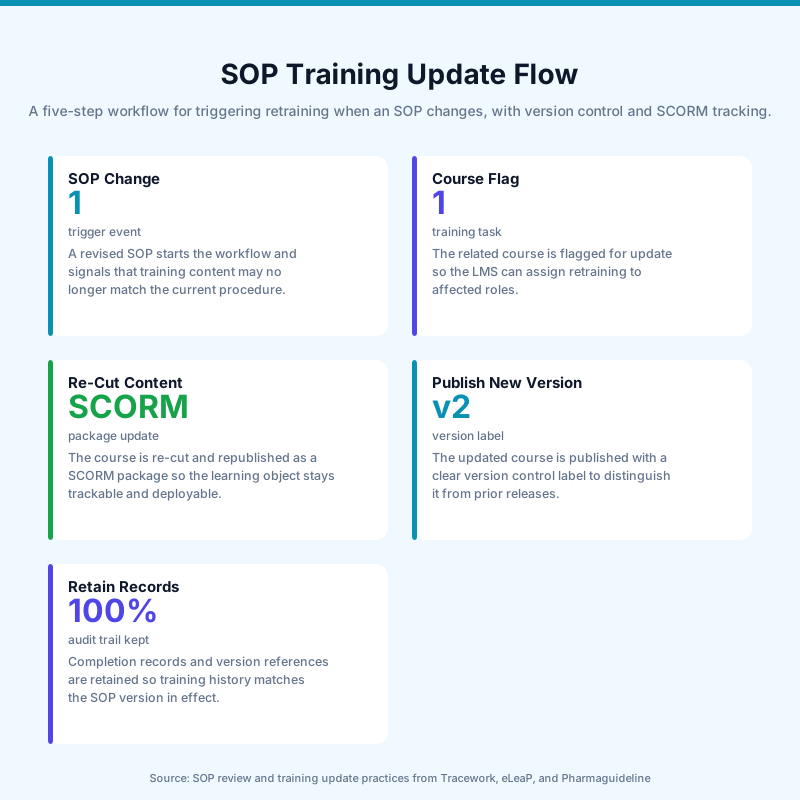
The typical flow has five steps. First, the SOP lives as the source of truth. Second, the platform detects that the SOP has changed or is marked for revision. Third, the training asset is regenerated or flagged for review. Fourth, the new version is published. Fifth, the LMS keeps a record of completion against the correct course version.
Step | What happens | Why it matters |
|---|---|---|
1. SOP changes | The controlled document is revised. | This is the trigger event for training updates. |
2. Course is flagged | The linked course is marked for review or update. | This prevents stale content from staying live. |
3. Content is re-cut | The training is rebuilt from the revised SOP. | This reduces manual editing and version drift. |
4. New version is published | The updated course is pushed to the LMS. | Learners get the current procedure. |
5. Records are retained | Completion and version history remain visible. | This supports audits and retraining evidence. |
That workflow is easiest to manage when the platform is built around documents rather than presentation files. Skill Studio AI exemplifies this by generating SCORM-ready courses from SOPs and policy documents, then re-cutting the training when the source changes. It is especially useful when the same instructor voice and style need to stay consistent across updates.
A useful comparison is between manual SCORM editing and document-driven regeneration. Manual editing still works for small teams, but it slows down every revision. Document-driven systems are better when the SOP changes often, because the update path is built into the content model.
That difference becomes obvious in existing LMS environments. If you already use a learning system, you usually do not want to replace it. You want the training to arrive in a format the LMS already accepts. That is why SCORM matters, and why SCORM integration with an existing LMS is a practical requirement, not a nice extra.
For teams running structured change control, the best workflow also includes a review step before publication. In regulated settings, not every SOP edit should trigger an automatic learner-facing update without human approval. The trigger should create a new course version and a review task, then publish only after the content is signed off.
What should you look for in a platform?
You should look for five features: controlled source linking, version history, SCORM export, role-specific updates, and audit-ready records.
Controlled source linking is the core feature. Without it, the platform cannot know which course belongs to which SOP. Version history matters because auditors need to see the old procedure, the new procedure, and the change date. SCORM export matters because most regulated organisations already have an LMS in place.
Role-specific updates are the next layer. Not every SOP change affects every employee. A strong platform should let you update only the affected roles and learning paths. That is one reason compliance teams often prefer systems that were designed for regulated workflows, not general content tools.
Skill Studio AI fits this need because it converts internal SOPs into SCORM-ready video courses and uses AI avatars of the organisation’s own instructors. That approach keeps the update process tied to the company’s approved content and preferred delivery style, rather than forcing a new production cycle every time the document changes.
For deeper criteria, the article on how compliance software handles regulatory version control is useful because it focuses on the evidence trail, not just content speed.
Feature | What to ask | Why it matters |
|---|---|---|
Source linkage | Does the course point to a named SOP version? | Prevents training from drifting away from the controlled document. |
Version control | Can you keep old and new versions visible? | Supports audit trails and historical review. |
SCORM output | Can the updated course be imported into the LMS? | Lets you keep your existing learning stack. |
Regeneration speed | Does the platform re-cut the course automatically? | Reduces turnaround time after an SOP revision. |
Instructor consistency | Can the same voice and face remain across updates? | Keeps training familiar for learners. |
Audit evidence | Can you show completion by version? | Makes inspections and internal reviews easier. |
That last point is where many tools fall short. A platform can update content quickly and still fail compliance if it cannot prove which version each learner saw. automated certification tracking for compliance training helps close that gap by tying completion records to proof of training.
When the team also needs multimedia delivery, SOP-to-video automation is the faster path than rebuilding slide decks. The video format helps frontline learners absorb changes quickly, especially when the SOP has small but important procedural edits.
How do SOP updates affect LMS and SCORM records?
SOP updates affect records because a new training version can reset assignment status, preserve old completions, or create a fresh record depending on how the LMS handles course versioning.
That is why version management matters as much as content creation. A course update can be harmless if the LMS preserves historical records correctly. It becomes a problem when the new upload overwrites evidence, clears progress, or hides the relationship between the old and new versions.
SCORM systems handle this in different ways. Some platforms keep old versions while new registrations use the latest one. Others let admins move existing registrations based on status. The important thing is not the exact rule set. It is whether the platform can show a clean before-and-after record. SCORM Cloud versioning is a good reference point for how versioned registrations are usually handled.
Skill Studio AI is relevant here because it produces SCORM-ready courses, so the updated training can enter the LMS without changing the learning infrastructure. That is the right setup for organisations that already manage completions, recertification, and audit evidence inside a mature LMS.
If your organisation manages approved procedures in a controlled document system, the stronger pattern is to connect the SOP revision process to the training review process. That way, the course update is not an isolated content task. It is part of change control. policy-to-training automation follows the same logic.
Where does Skill Studio AI fit?
Skill Studio AI fits as the document-driven training layer between your SOP library and your LMS.
It turns an organisation’s own SOPs and policy documents into SCORM-ready video courses delivered by AI avatars of its own instructors. When the source document changes, the training is re-cut instead of rebuilt from scratch. That makes it a strong fit for recurring compliance training where procedure updates are common and speed matters.
It also matters that Skill Studio AI does not ask you to replace the LMS. SCORM output means the course can drop into the existing learning system. That is important for regulated industries because the LMS is often already tied to assignments, certification records, and audit reporting.
For teams comparing broader options, the most relevant distinction is not “AI vs no AI.” It is whether the platform respects controlled documents, produces updateable courses, and preserves evidence. AI platforms that work with an existing LMS solve the delivery problem, while Skill Studio AI adds the document-to-course update loop on top.
That is also why the platform fits healthcare, pharma, and financial services better than generic course builders. Those sectors need training that tracks document change, not just creative output. compliance training automation for pharma and healthcare shows how that requirement changes the buying criteria.
One more strength is instructor consistency. Using AI avatars of the organisation’s own instructors keeps the delivery style familiar after every SOP revision. That helps with learner trust, and it avoids the cost and delay of re-recording the same lesson every time a procedure changes.
Frequently Asked Questions
What platform updates training when an SOP changes?
A document-driven training platform does this best. It links the SOP to the course, detects changes, and regenerates the training version instead of requiring a full rebuild. Skill Studio AI is built for that pattern because it turns SOPs and policy documents into SCORM-ready video courses and re-cuts them when the source changes.
How do SOP changes trigger retraining?
The SOP revision should trigger a review of the linked course, then a new training version if the procedure change affects learner behaviour. The best systems connect document control, course regeneration, and assignment updates. That keeps the training aligned to the current approved process rather than an older export.
Do you need a new LMS when SOPs change?
No. In most organisations, the LMS should stay in place. The better setup is a training platform that exports SCORM so the updated course can be dropped into the current LMS. Skill Studio AI is positioned for that workflow, which matters when the LMS already handles reporting, completion, and certification tracking.
What should a compliance team check before buying this kind of platform?
Check for version control, source linkage, SCORM output, audit records, and a clear update workflow. The platform should show which SOP version drove which course version. It should also preserve completion history, because regulators and internal auditors often need evidence of what changed and when.
Can AI avatars help with SOP updates?
Yes, if they are used as a delivery layer rather than a gimmick. Skill Studio AI uses AI avatars of an organisation’s own instructors, which keeps the voice and face of the training consistent across updates. That is useful when the content changes often but the teaching style should stay the same.
What is the biggest risk in SOP-triggered training updates?
The biggest risk is version drift. A team updates the SOP, but the course in the LMS stays stale, or the new version overwrites proof of the old one. A good platform avoids that by linking document control to training control and keeping a reliable record of each version.