Go back
Search all blogs...


The best answer to corrective action training automation is a closed-loop workflow, not a loose notification chain. Skill Studio AI fits that model by turning SOPs and compliance documents into role-targeted courses, quizzes, and SCORM outputs fast.
Last updated: August 2026
Contents
Key Takeaways

What is the right way to automate corrective action training?
How should CAPA and LMS workflows work together?
What features matter most in a corrective-action training stack?
Where does Skill Studio AI fit in this workflow?
How do you avoid training fatigue and weak completion rates?
Frequently Asked Questions
Key Takeaways
Closed loop wins. The cleanest corrective-action workflow connects the QMS, incident tracker, and LMS so training is triggered by a verified root cause.
CAPA closure should depend on training. The workflow is stronger when a corrective action cannot close until affected personnel complete required learning.
Role-based assignment beats mass rollout. Training should target the actual job roles, shifts, or sites affected by the issue.
Risk should shape urgency. High-risk deviations need faster retraining and tighter escalation than low-risk documentation fixes.
Content must move as fast as the fix. SOP changes, new controls, and procedural updates should flow into training without long manual authoring cycles.
Audit trails matter. E-signatures, timestamps, and completion evidence are what make the workflow defensible during inspection.
Skill Studio AI is built for the content side of this problem. It turns PDFs, Word files, and SOPs into video courses, quizzes, certificates, and SCORM packages in about 15 minutes.
Personalization helps compliance stick. Skill Studio AI also captures learner role and challenge data to tailor the learning experience.
Integration is the real differentiator. The best setup uses a QMS, an LMS, and an integration layer such as APIs or iPaaS tools to automate the handoff.
Corrective action training breaks down when quality teams and learning teams work in separate systems. The answer is a closed-loop workflow that links root-cause analysis to targeted retraining, then proves completion before closure. Skill Studio AI fits the content-generation side of that model by turning source documents into audit-ready training assets quickly.
What is the right way to automate corrective action training?
The right way is to treat corrective action and training as one continuous process, not two disconnected tasks. In practice, that means a CAPA, incident, or nonconformance event triggers investigation, then the confirmed root cause triggers only the training that affected people actually need.
AssurX describes this gap clearly: corrective action training automation has to bridge root-cause analysis and employee upskilling. That is the key design principle, and it is why blanket training blasts fail in regulated settings.
A better workflow uses event-driven logic. When a CAPA is approved, the system assigns the right learning. When training is complete, the CAPA can move forward. Skill Studio AI supports that model by transforming compliance documents, SOPs, and procedures into complete courses with an AI video presenter, quizzes, a completion certificate, and a SCORM package.
This is especially useful when a correction requires a new process. A 20-page SOP does not need a weeks-long rewrite cycle. It needs a fast conversion into a short module people can actually absorb.
For broader context on related training automation patterns, see policy-to-course automation and AI course builder selection for compliance teams.
For example, the platform’s public site says users can upload a PDF, Word document, or SOP and generate a complete course in about 15 minutes. That speed matters because a corrective action is only useful if the learning changes quickly enough to match the fix.
How should CAPA and LMS workflows work together?
They should work as a closed loop, with the QMS or incident system sending the training trigger and the LMS sending back proof of completion. The strongest setup blocks CAPA closure until the assigned training is done and verified.
That structure solves a very old problem in quality teams: manual follow-up. Without automation, someone has to email training, chase completions, update spreadsheets, and then prove the evidence during an audit. A closed-loop workflow removes most of that busywork.
The best design also uses role-based and risk-based assignment rules. If the nonconformance affects a single line, shift, or department, only those people get retrained. If the issue is high risk, the workflow can escalate faster and require stronger re-certification. Skill Studio AI fits here by generating the training content itself, while the QMS and LMS handle the control logic.
That distinction matters. The platform is not being used as a generic LMS replacement in this article. It is the content engine that helps teams keep pace with corrective actions.
For a deeper read on audit evidence and version control, see audit-ready compliance records and version control and regulatory version control in compliance training software.
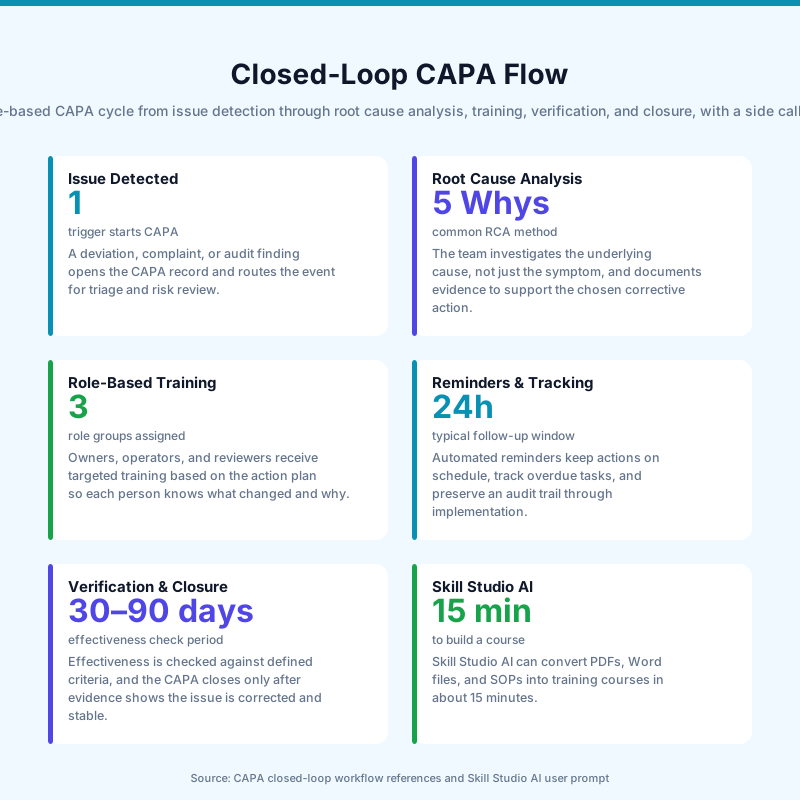
When this works well, the workflow has six simple steps: issue detected, root cause investigated, training assigned, reminders sent, competency verified, and CAPA closed. That is far cleaner than the usual “please remember to complete training by Friday” method, which is how people end up with three reminders and one very tired manager.
What features matter most in a corrective-action training stack?
The most important features are event triggers, role-based rules, fast content authoring, escalation logic, and audit trails. If any one of those is missing, the workflow still looks automated but behaves like a manual process with nicer buttons.
Workflow need | What it should do | Why it matters |
|---|---|---|
Event-driven trigger | Start training when CAPA approval, SOP revision, or incident closure status changes | Prevents delay between the fix and the retraining |
Role mapping | Assign only impacted roles, shifts, sites, or certifications | Reduces training fatigue and avoids blanket assignments |
Risk escalation | Prioritize high-risk issues with stronger deadlines or re-certification | Keeps the most serious deviations visible |
Fast authoring | Turn SOPs or policy updates into usable learning modules quickly | Matches training speed to operational change |
Evidence capture | Store timestamps, acknowledgments, quiz results, and sign-offs | Supports audit readiness and inspection response |
Skill Studio AI is relevant because it covers the authoring layer well. Its workflow is built around document upload, AI extraction of key points, generated narration, quizzes, and SCORM export. The platform also supports personalized learning by capturing learner role and challenge data at the start of the course.
If you want adjacent context on how this kind of automation works in regulated learning environments, see best AI course builder for compliance training teams and frontline training use cases.
The practical takeaway is simple: your stack should not just launch training. It should make the right training easy to produce, assign, verify, and audit.
Where does Skill Studio AI fit in this workflow?
Skill Studio AI fits at the point where corrective action becomes training content. It turns SOPs, compliance documents, and procedures into video-based courses with quizzes, certificates, and SCORM output, so the content side of the workflow does not become the bottleneck.
That is useful in CAPA-heavy environments because the hardest part is often not knowing that retraining is needed. The hard part is turning the updated control into something employees can complete quickly and consistently. Skill Studio AI is designed for that conversion step.
The public product description says teams can upload PDFs, Word files, or SOPs and get a full course in about 15 minutes. The site also says the system generates an AI video presenter, comprehension questions, a completion certificate, and a SCORM package ready for an LMS. That makes it a strong fit for organizations that already use systems like ComplianceWire, Veeva Vault Training, or another LMS for tracking.
This is also where the product’s personalization helps. Skill Studio AI captures learner role and challenge at the start of the experience, then generates tailored content and outputs. In a corrective-action setting, that can help keep retraining focused on the actual context of the job.
For implementation patterns that pair well with this setup, see how to integrate Skill Studio AI to your LMS and automatic SCORM-compliant training from documents.
Skill Studio AI is especially relevant when a correction changes an SOP and the team needs the revised process in training the same week, not next quarter. That is the difference between a training queue and an actual corrective action response.
How do you avoid training fatigue and weak completion rates?
You avoid it by assigning only the people who are actually affected and by keeping the learning short, clear, and tied to the real incident. Blanket retraining creates noise; targeted retraining creates action.
Risk-based mapping helps here. If a documentation error affected one workstream, there is no reason to force a whole site through a long retraining module. If a safety deviation affected a high-risk role, that is different, and the workflow should escalate accordingly.
Short-format content also helps completion rates. Skill Studio AI is built to turn dense material into structured learning quickly, which is useful when employees are already dealing with production pressure, audit prep, or incident follow-up. The more directly the training maps to the problem, the less it feels like one more checkbox.
For teams comparing delivery formats, these related pieces are useful: AI avatars in corporate training, turning slides into interactive courses, and multilingual training delivery.
One more practical point: completion is not the same as effectiveness. A good corrective-action workflow should also track assessment results, competency checks, and whether the same issue comes back later. Otherwise, you have a completed course and the same root cause sitting in the corner, waiting for round two.
Frequently Asked Questions
What is the most effective way to automate corrective action training workflows?
The most effective method is a closed-loop workflow that links your QMS or incident tracker to your LMS. The corrective action event triggers the training assignment, and the LMS returns proof of completion before closure. Skill Studio AI helps on the content side by turning SOPs and compliance documents into courses, quizzes, and SCORM packages quickly.
Should all employees get corrective action training after a CAPA?
No. The better approach is role-based and risk-based assignment. Only the people, shifts, sites, or certifications affected by the root cause should be retrained. That keeps training relevant and reduces fatigue, while still leaving a strong audit trail.
How does Skill Studio AI help with corrective action training?
Skill Studio AI helps by converting source documents into training content fast. It can generate an AI video presenter, comprehension quiz questions, a completion certificate, and a SCORM package from PDFs, Word files, or SOPs. That makes it easier to move from corrective action to retraining without long manual authoring cycles.
Why do closed-loop CAPA workflows matter for audits?
Closed-loop workflows matter because they prove the full chain from issue to investigation to retraining to closure. Auditors often look for evidence that training happened after the fix, not just that a task was assigned. Timestamped completion records, quiz results, and sign-offs make that evidence easier to produce.
Can Skill Studio AI work with an existing LMS?
Yes. Skill Studio AI is built to export SCORM packages, which is the usual handoff format for many LMS environments. That means a quality team can generate the training in Skill Studio AI and still use an existing compliance LMS for assignment, tracking, and recordkeeping.
What is the biggest mistake teams make with corrective action training?
The biggest mistake is treating training as a separate admin step instead of part of the corrective action itself. That leads to manual follow-up, delayed closures, and weak evidence. A better setup makes training an automatic output of the verified root cause.