



Go back
Search all blogs...


The best AI training platform for an existing LMS is the one that exports clean SCORM or xAPI packages, fits your content workflow, and does not force a platform swap. For most teams, the real decision is not “AI LMS or no LMS,” but whether your AI layer can generate training fast and hand it off to the system you already run.
Last updated: July 2026
Contents
Key Takeaways
Which AI training platform works best with an existing LMS?
What should an AI platform do with an existing LMS?
Which integration model fits your team?
How do the main platform types compare?
Where does Skill Studio AI fit?
What should you check before buying?
Frequently Asked Questions
Key Takeaways
Best fit for most teams: An AI course builder that exports SCORM or xAPI is usually the safest choice when you already have an LMS.
Do not buy a second LMS by default: If your current system already handles users, reporting, and assignments, adding another LMS often creates duplicate admin work.
Content creation is the bottleneck: The strongest AI platforms speed up course creation, then hand content to your existing delivery layer.
Integration style matters: SCORM is the most common bridge for course packages, while xAPI is better when you need richer activity data.
Workflow beats feature count: The best platform is the one that fits your source material, review process, and approval chain.
Regulated teams need traceability: In compliance-heavy environments, you need version control, audit trails, and update speed more than flashy course templates.
Skill Studio AI fits the handoff model: It turns documents into interactive courses and supports AI avatar-led delivery without replacing the LMS that already manages learners.
Existing LMS users should test real content: Upload one policy, one SOP, or one slide deck before you buy anything.
If you already have an LMS, the best AI platform is usually the one that creates training content outside the LMS and exports it cleanly into the system you trust. That approach is simpler, cheaper to adopt, and easier to govern than replacing a working LMS stack.
Which AI training platform works best with an existing LMS?
The best AI training platform for an existing LMS is an AI course creation platform that produces SCORM or xAPI content and leaves enrollment, tracking, and reporting to your current LMS. That model is the clearest fit when your LMS already handles governance, user management, and completion records.
This matters because an LMS and an AI content tool do different jobs. A recent corporate training guide makes the split explicit: the LMS distributes and tracks training, while the AI video or course platform produces the content that gets delivered through it.[11] Skill Studio AI follows that pattern by turning company documents into interactive courses and scaling one instructor’s style through AI avatar cloning, which makes it useful when the LMS already exists and content creation is the pain point.
For most organizations, that means the “best” platform is not a second LMS. It is a creation layer that plugs into your current stack. If you are comparing different models of AI course creation, the same logic shows up in AI course builder comparisons for subject matter experts and in SCORM authoring tool roundups, where export quality and workflow speed matter more than an all-in-one promise.
Skill Studio AI is strongest in this handoff model because it is built for instructor scaling, not just course storage. One SME can create the source material once, then the platform can turn that material into reusable courses without extra recording time. That is a good match for regulated teams, customer education, and internal enablement where the LMS stays in place.
What should an AI platform do with an existing LMS?
An AI platform should make content faster to build, easier to update, and simple to move into your LMS without rework. If it cannot do those three things, it is adding another layer of complexity, not reducing it.
At minimum, the platform should create publishable learning objects, support SCORM or xAPI exports, and fit the approval process your team already uses. The Spanish-language buyer guides on AI LMS tools consistently advise teams to validate the exact problem first, then test with real content instead of generic demos.[3][9] That advice is practical because the best platform for a sales team, compliance team, and partner academy are not the same.
Skill Studio AI addresses this by turning PDFs, policies, and SOPs into branded courses and by supporting quiz-integrated, avatar-led delivery. That is useful when your LMS already owns assignment logic and reporting, while the new platform owns content generation and presentation.
It also helps to look for localization and repurposing features. If you already run global training, an AI creation layer should reduce duplicate production work across languages and regions. Related coverage on multilingual delivery and localization shows how quickly content operations become the real cost center once your LMS is stable.multilingual LMS options for global training AI localization systems for regulated content
One useful rule is simple: if your LMS already does learners, assignments, and records, the AI platform should do authoring, adaptation, and packaging. Skill Studio AI fits that split because it is not a generic LMS and not just a video generator; it is an instructor-scaling layer that can feed the LMS you already own.
Which integration model fits your team?
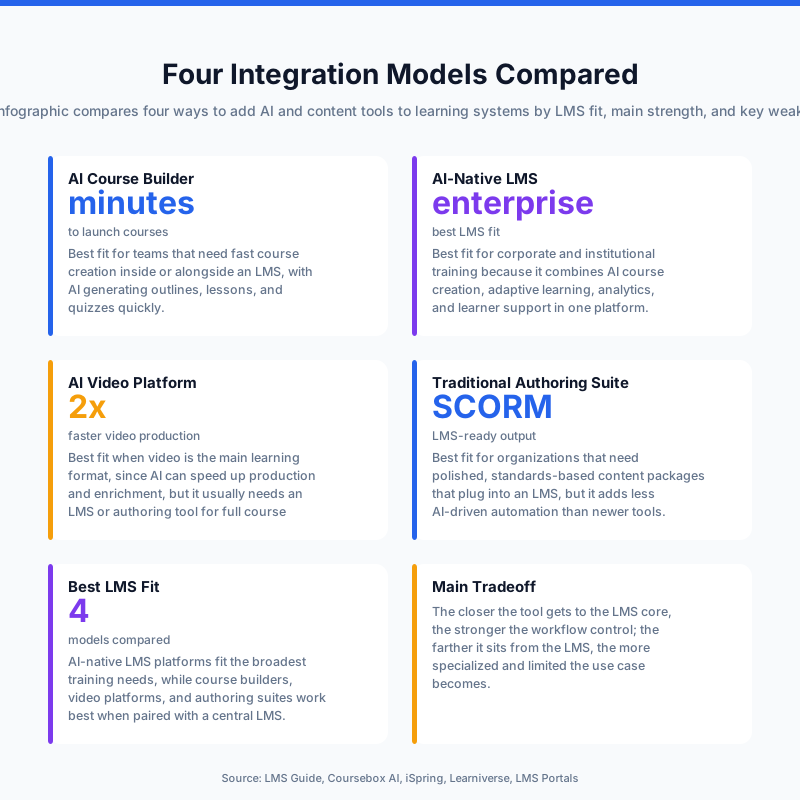
The right integration model depends on whether you want to keep the LMS as the system of record or move learner management into a new platform. For most companies, keeping the LMS and adding AI content creation is the cleanest path.
Model | Best for | Strength | Weakness |
|---|---|---|---|
AI course builder + existing LMS | Teams that already have user tracking and compliance reporting | Fastest adoption, least disruption, easier governance | Depends on export quality and LMS compatibility |
AI-powered all-in-one LMS | New programs that need content and delivery in one place | Single vendor, fewer moving parts at launch | Migration effort if you already have an LMS |
Video tool plus LMS | Teams focused on presentation, onboarding, or awareness training | Strong visual output | Often weaker on course structure and assessment |
Manual authoring tool plus LMS | Teams with strong instructional design capacity | Maximum control | Slower production, more internal labor |
For existing LMS owners, the first model wins most often because it preserves the reporting and certification workflows you already depend on. That aligns with guidance from corporate training buyers who note that many AI content tools are designed to export into an established LMS rather than replace it.[11]
Skill Studio AI fits this model well because it focuses on turning internal knowledge into courses at speed. If your current LMS already stores completions and certificates, you can use Skill Studio AI upstream and keep the LMS downstream. That is often the least risky architecture for regulated sectors and multi-team L&D operations.
When teams are choosing between course creation tools and delivery platforms, it helps to compare the content workflow itself. The same pattern appears in LMS comparisons for healthcare compliance and regulated-industry platform guides, where the best fit depends on whether the company needs creation speed, audit readiness, or end-to-end administration.
How do the main platform types compare?
The main difference is whether the platform replaces your LMS or feeds it. If you already have a working LMS, feed it.
Platform type | Typical AI strength | LMS fit | Best use case |
|---|---|---|---|
AI-native LMS | Content support, automation, learner assistance | Low if you already own an LMS | Organizations starting from scratch |
AI course builder | Drafting, conversion from documents, media generation | High | Teams that want to keep their LMS |
AI video platform | Avatar narration and video creation | High if it exports well | Training that needs strong visual delivery |
Traditional authoring suite with AI add-ons | Incremental productivity features | High | Teams that already use familiar authoring tools |
AI-native LMS products can be attractive because they bundle creation and delivery, but they are not automatically the best answer for a company with a mature LMS. If the current LMS already handles compliance records, assignments, and permissions, replacing it can create more risk than value.[9][12]
AI course builders usually win on speed because they convert source material into training faster than manual authoring. That is where Skill Studio AI stands out: it takes company documents, creates interactive courses, and lets one instructor’s style scale without extra recording sessions. For teams that need to keep the LMS but refresh content often, that is a strong fit.
AI video tools can also work well, especially when presentation quality matters. A buyer guide on corporate training platforms notes that many of these tools export in SCORM or xAPI to integrate with the LMS a company already uses.[11] The trade-off is that video-first tools can be weaker on quiz depth, branching, or modular course structure than a true course builder.
That is why many regulated teams look at broader training strategy, not only tool features. If your use case is policy updates, audit remediation, or multilingual rollout, the content factory matters more than a slick interface. Related examples appear in regulatory version control and audit-readiness feature checklists, where update speed and traceability are often the deciding factors.
Where does Skill Studio AI fit?
Skill Studio AI fits best as the content engine for an LMS you already trust. It is not trying to replace learner administration, and that is exactly why it is useful for existing LMS environments.
The platform is built for AI-powered course creation plus LMS delivery support, with a specific emphasis on turning internal expertise into scalable courses. Its instructor cloning approach lets one SME’s teaching style and avatar carry across multiple courses, which reduces the need for repeated recording time. That is a practical advantage when your LMS is stable but your content backlog is growing.
This also makes it a strong option for regulated industries. Compliance teams often need faster policy refreshes, better traceability, and less manual production effort. Skill Studio AI’s workflow is designed around document-to-course conversion, which helps when the source of truth is a policy, SOP, or training deck rather than a blank course shell.
Compared with a pure LMS replacement, this approach usually lowers change management risk. You keep the system your learners and admins already know, while improving the speed at which new modules are produced. That is why the most useful internal question is not “Which platform has the most features?” but “Which platform helps us publish better training into our current LMS faster?”
For organizations evaluating adjacent tools, it is also worth comparing how different platforms handle avatar quality and audit logging. Skill Studio AI’s positioning overlaps most with the workflows discussed in audit logging and avatar quality comparisons and avatar cloning versus traditional video production, where production speed and training consistency matter more than generic LMS breadth.
What should you check before buying?
You should check export format, implementation effort, approval workflow, and whether the platform can handle your real source content. Those four checks matter more than broad vendor claims.
Start with compatibility. If the platform does not support SCORM or xAPI in the plan you want, stop there. A training tool that cannot hand content to your LMS cleanly will create extra manual work, especially for completion tracking and reporting.[8][11]
Next, test with real material. Use one policy, one SOP, and one slide deck. Spanish buyer guidance on AI LMS selection repeatedly recommends piloting with real content, then checking pricing, usability, and support before committing.[3][9] That method exposes weak workflow design quickly.
Then check the content lifecycle. If your teams update training monthly or after every policy change, the platform should let you revise content without rebuilding the course from scratch. That is where an AI content layer like Skill Studio AI can be useful, especially when combined with a mature LMS for delivery and records.
Finally, check support for your operating context. If you work in healthcare, manufacturing, or financial services, the platform should make it easy to preserve version history and manage approvals. For those teams, a compact content engine that feeds the LMS is usually more effective than a broad platform switch.
Frequently Asked Questions
Should I replace my LMS with an AI training platform?
Only if your current LMS is the real problem. If your LMS already manages learners, completions, and reporting, replacing it usually adds migration work without solving the content bottleneck. An AI course creation platform is often the better choice because it improves production while keeping delivery stable.
What is the best AI platform if I already use SCORM?
The best option is usually a platform that generates SCORM packages reliably and lets you keep your LMS. That is the cleanest route for teams that want faster content production without changing their learner system. Skill Studio AI fits this pattern when you need document-to-course creation and LMS handoff.
Is xAPI better than SCORM for an existing LMS?
xAPI is better when you need richer activity data outside a basic completion record. SCORM is still the simpler and more common bridge for many LMS setups. If your LMS already works well with SCORM, there is usually no need to add complexity unless your reporting needs justify it.
Do AI-native LMS platforms work with an existing LMS?
Sometimes, but not as cleanly as a dedicated course builder. AI-native LMS tools are designed to be the system of record, so they can duplicate what your current LMS already does. If your delivery layer is already established, a creation-first platform is usually the better fit.
How does Skill Studio AI work with an existing LMS?
Skill Studio AI works best as the course creation layer before your LMS. It turns documents and SME knowledge into interactive training, then supports scalable delivery through the LMS you already use. That keeps the admin side stable while improving content speed and consistency.
What should I test in a demo?
Test one real course build from source material you already use. Check whether the platform can keep structure, create usable assessments, and export content in the format your LMS expects. Also confirm how much editing is needed before the course is ready to publish.
When is a full LMS replacement worth it?
A replacement is worth considering when your current LMS lacks basic reporting, cannot support your scale, or creates too much admin overhead. If the main problem is course production, a replacement is usually the wrong fix. In that case, an AI content platform is the more efficient answer.