


Go back
Search all blogs...


Financial institutions that pair dense SOP PDFs with short, targeted training videos see higher knowledge retention, faster onboarding, and fewer costly errors.
Last updated: May 2026
Contents
Key Takeaways
What Does It Mean To Complement SOPs With Video?
Why Do Traditional PDF SOPs Fall Short In Banks And Financial Institutions?
Do Videos Actually Improve Knowledge Retention?
How Do Video SOPs Improve Compliance And Audit Readiness?
What Does A Good Video-Enhanced SOP Look Like In A Bank?
How Should Financial Institutions Structure Their Video Training Library?
How Does This Approach Fit With Existing LMS Platforms Like ComplianceWire Or Veeva?
What Are Common Pitfalls When Adding Video To SOPs?
Where Does Skill Studio AI Fit In?
Frequently Asked Questions
Key Takeaways
Video boosts retention Short SOP videos significantly outperform dense text for knowledge retention, especially for complex, step-based processes.
PDFs are necessary but insufficient Static SOP documents satisfy auditors, but staff rarely read or remember them in full.
Multi-modal training wins Combining video, text, and quick reference aids creates stronger understanding than any single format alone.
Microlearning beats marathons Chunked, 3–7 minute videos mapped to specific SOP sections align better with how adults learn.
Regulators are comfortable with video Bodies like the FDIC already use video for technical training, showing it fits regulated contexts.
Assessment closes the loop Embedding quizzes with SOP videos gives documented proof of training and understanding.
Good design matters Visuals, narration, and text together create a richer learning experience than “talking PowerPoints.”
Skill Studio AI accelerates the shift The platform turns dense SOPs into audit-ready, role-targeted video training in minutes.
Most banks and financial institutions already have SOPs, but they live in 40-page PDFs that nobody reads until an auditor shows up or something goes wrong. This article breaks down why adding short training videos on top of those SOPs boosts knowledge retention, how that plays out in regulated financial environments, and where tools like Skill Studio AI fit into a serious, compliance-first strategy.
What Does It Mean To Complement SOPs With Video?
Complementing SOPs with video means keeping your formal written SOPs for compliance while adding short, targeted videos that demonstrate the same procedures in a more digestible, visual format. Instead of replacing the PDF policy, you wrap it in explainer videos, walkthroughs, and scenario clips that help people actually remember what to do.
In practice, this usually looks like:
- A formal SOP PDF stored in your document management system.
- One or more short videos that walk through the key steps, decisions, or risk points in that SOP.
- Knowledge checks or quizzes that confirm staff can apply what they’ve seen.
Vendors like Biteable highlight this approach: they recommend defining whether a video SOP is for onboarding, troubleshooting, compliance, or daily processes, then scripting short, action-oriented clips tied to specific procedures. According to Biteable, well-designed SOP videos lead to streamlined operations and higher performance because they avoid training fatigue from long text documents.
Skill Studio AI is built around this exact pattern for regulated industries, turning dense SOPs, compliance documents, and procedural manuals into audit-ready video training with role-targeted delivery and version control, so you never have to choose between “good for auditors” and “good for humans.”
Why Do Traditional PDF SOPs Fall Short In Banks And Financial Institutions?
Traditional PDF SOPs fall short because they are optimized for documentation and audits, not for how front-line staff in branches, operations, or risk functions actually learn and retain information.
Most banking SOPs are long, dense, and written in compliance language. ScreenSteps, which works extensively with financial institutions, notes that a standard procedure is often “a formal document with lots of information” written like a technical manual packed with corporate jargon. That’s perfect for demonstrating control design, but it’s a poor medium for teaching a new hire how to escalate a suspicious transaction under time pressure.
Some specific problems you probably recognize:
- 30–60 page “catch-all” SOPs covering multiple edge cases, which new staff skim at best.
- No visual examples for system steps: for example, how to navigate AML monitoring software or a core banking platform.
- The same PDF used for both veterans and new hires, even though their needs are very different.
- Knowledge decay: staff pass initial assessments, then forget key steps when they rarely encounter a scenario.
ScreenSteps highlights that step-by-step procedures with screenshots perform better because they combine written and visual instructions, especially when showing employees how to use software. In other words, even within text SOPs, adding visuals moves the needle on comprehension and retention.
Skill Studio AI takes that principle further by generating short video walkthroughs from your SOPs, so your AML analyst doesn’t just read a paragraph about flagging a suspicious wire—they see a realistic screen-level walkthrough delivered by an instructor avatar that matches your in-house style.
Do Videos Actually Improve Knowledge Retention?
Yes, well-designed SOP videos significantly improve knowledge retention compared to text-only PDFs, especially when they combine visuals, narration, and concise on-screen text.
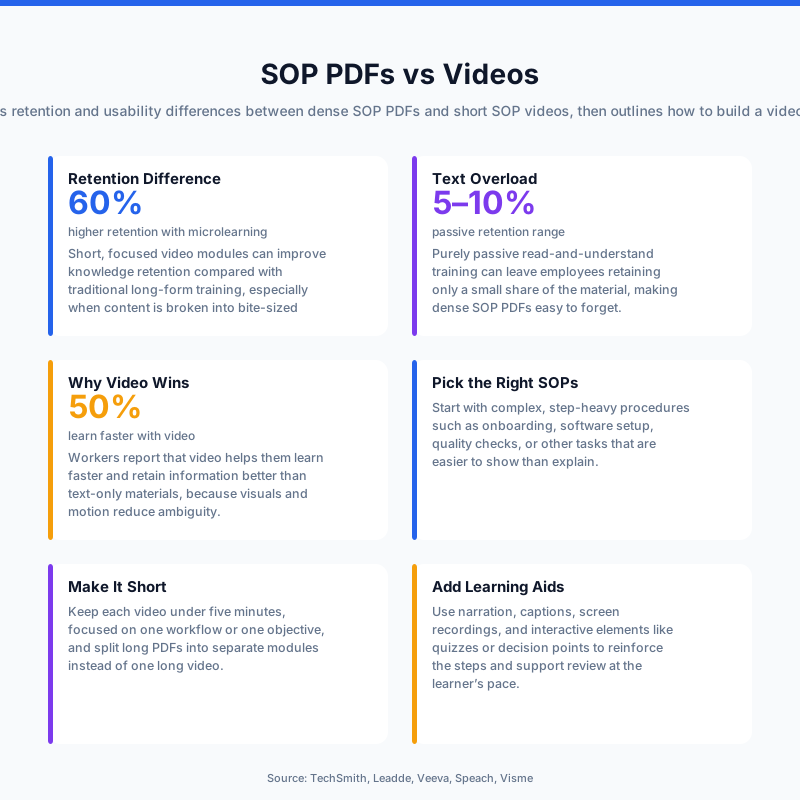
Several learning vendors and studies have quantified this difference. Biteable cites research indicating that people retain around 95% of a message when it’s delivered via video, compared to about 10% through text alone. While numbers vary between studies, the pattern is consistent: multi-sensory formats (visual + auditory) stick better than text-heavy documents.
Panopto, a video learning platform, frames this through the “forgetting curve” from cognitive psychology. They emphasize that learners forget a large portion of what they read after a single exposure, but repetition and re-exposure through video can flatten that curve. Panopto recommends chunking content into bite-sized video segments and using spaced repetition—both approaches that are hard to achieve with a single static PDF.
TechSmith, another video-focused vendor, explains that combining visuals, narration, and text creates a comprehensive learning experience that boosts both understanding and retention. In the context of financial procedures, this might mean showing:
- A short narrative scenario about a suspicious cash pattern.
- A screen recording of how to file an internal suspicious activity report.
- On-screen callouts reinforcing key thresholds, timelines, or approval steps.
Skill Studio AI follows these best practices by turning long SOPs into shorter, structured video lessons that can be revisited on demand. Multilingual localization is on our roadmap — today the SOP-to-video pipeline generates English-language narration only, so plan accordingly for teams in Ireland, DACH, and the US.
How Do Video SOPs Improve Compliance And Audit Readiness?
Video SOPs improve compliance and audit readiness by making it more likely that staff understand and follow procedures correctly, and by giving you stronger, more granular training evidence.
From a regulator’s point of view, the existence of an SOP is only half the story; the question during a 483 remediation or AML model-validation review is whether staff actually follow it in practice. This is where videos help:
- They reduce interpretation risk. A walk-through of how to capture KYC documents or perform a high-risk customer review leaves less room for ambiguity than a paragraph in a PDF.
- They support behavior under pressure. A front-line employee is more likely to recall a visual scenario video than a clause in a manual when faced with a live customer.
- They generate documented proof of training and retention.
Docustream notes that SOP videos combined with embedded quizzes provide documented proof that training was delivered and retained, because you can show not just that someone opened a PDF, but that they watched a specific video and passed a targeted knowledge check. That’s a much stronger position in a regulatory exam or internal audit.
Regulators themselves are not allergic to video. The FDIC’s Technical Assistance Video Program provides training videos on regulatory issues for bank officers and employees, explicitly using video to explain complex requirements. This is a good signal that supplementing your written SOPs with video is fully in line with a strong compliance culture.
Skill Studio AI is designed for exactly this environment: it produces audit-ready video training from your SOPs, with version control, so you can demonstrate training content and completion evidence when examiners ask to see your program (21 CFR Part 11–style controls are on our roadmap, not yet shipped).
What Does A Good Video-Enhanced SOP Look Like In A Bank?
A good video-enhanced SOP in a bank combines a clear written procedure with short, focused videos that map directly to key tasks, decisions, and risk points.
Think of a typical anti-money laundering (AML) SOP. Instead of one monolithic 50-page PDF, you might have:
- A master SOP document stored in your policy library for auditors.
- A 5-minute video: “Overview of AML responsibilities for personal bankers.”
- A 7-minute system walkthrough: “How to log and escalate a suspicious transaction in [system].”
- A 3-minute refresher: “Red flags in cash transaction patterns.”
- A short quiz with scenario-based questions.
ScreenSteps’ banking SOP examples highlight several formats that work well in financial institutions: step-by-step procedures with screenshots, checklists for frequently repeated tasks, and flowcharts or decision trees for complex decision paths. All of these lend themselves naturally to video.
Here’s how that maps out:
Element | Traditional Approach | Video-Enhanced Approach |
|---|---|---|
Onboarding a new analyst | Single 40-page SOP PDF plus a lecture-style session | Series of 5–10 minute videos with visual walkthroughs, plus the PDF for reference |
Rare escalation scenario | Buried in an appendix of the SOP | Short scenario video showing the exact steps and system screens |
Evidence of training | Sign-off sheet that SOP was “read” | Completion data for specific videos plus quiz results |
Updates after a policy change | Reissue the entire PDF and email staff | Update/replace a 3–5 minute microvideo and notify relevant roles |
Skill Studio AI helps you build this structure quickly by ingesting your existing SOPs and turning them into structured video lessons, while keeping the written content intact for policy libraries and CAPA documentation.
How Should Financial Institutions Structure Their Video Training Library?
Financial institutions should structure their video training library around roles, processes, and regulatory themes, with each video mapped to a specific SOP section and outcome.
Panopto underscores the value of chunking content into bite-sized pieces and organizing it into topic-specific components, which reduces cognitive overload and makes it easier to find exactly what you need. For a bank, that typically means organizing content by:
- Role (e.g., teller, branch manager, AML analyst, loan officer).
- Process (e.g., account opening, wire transfers, suspicious activity reporting, KYC refresh).
- Regulation (e.g., AML, sanctions, consumer protection, data privacy).
Each video should have a clear purpose and link back to a specific SOP or policy. Biteable recommends defining the purpose upfront: onboarding, troubleshooting, compliance, or daily processes. That discipline prevents you from creating random explainer videos that don’t tie into your control framework.
Practical design tips that work well in banks and insurers:
- Keep key videos under 10 minutes; many teams find a 3–7 minute range ideal.
- Use realistic system captures rather than abstract animations for system-heavy procedures.
- Add real-world scenarios (“Here’s what happens when a customer disputes a card transaction”) to engage emotion and context, as Panopto suggests.
- Make everything searchable by SOP ID or policy number so risk and audit teams can map coverage quickly.
Skill Studio AI adds role-targeted delivery on top of this structure, so the branch team sees only what’s relevant to them, while the risk team gets deeper, more technical modules derived from the same SOP set.
How Does This Approach Fit With Existing LMS Platforms Like ComplianceWire Or Veeva?
Video-enhanced SOPs fit very naturally into existing LMS platforms such as ComplianceWire or Veeva Vault Training, because those systems are designed to host and track content rather than create it.
Most regulated financial institutions already use enterprise LMSs to manage mandatory training, provide assignment and reminder logic, and generate audit reports. The friction usually isn’t in the LMS; it’s in how fast and effectively you can turn a new or updated SOP into training content that people actually absorb.
With a video-complement model, your LMS remains the system of record. You simply change what you upload and assign:
- Instead of just a PDF and a generic multiple-choice test, you assign a short video module plus a targeted quiz.
- Instead of a one-time “annual AML training” object, you create a series of microlearning modules scheduled throughout the year (matching Panopto’s spaced repetition advice).
- Instead of long SCORM courses that are hard to update, you use smaller, modular objects tied to specific SOPs.
Skill Studio AI fits neatly into this ecosystem as the content engine that turns dense SOPs into video modules you can then publish into ComplianceWire or Veeva, preserving your existing investment in LMS infrastructure and reporting.
What Are Common Pitfalls When Adding Video To SOPs?
The most common pitfalls when adding video to SOPs are treating video as a one-off project, overproducing content, and failing to align videos tightly with your written procedures.
Some specific traps to avoid:
- Creating long “lecture” videos that simply read the SOP out loud. This adds time but doesn’t add value.
- Ignoring version control, so videos drift out of sync with the current SOP and create regulatory risk.
- Producing videos without embedded assessment, losing the chance to prove understanding.
- Building content once and never updating, even when regulators or internal policies change.
TechSmith’s guidance on strengthening SOPs with video emphasizes that visuals, narration, and text must work together, and that videos should be updated regularly to stay aligned with processes. Docustream’s focus on embedding quizzes is a direct response to the “we have no evidence they understood it” problem that many compliance teams face.
Skill Studio AI is explicitly designed with engineering-grade polish and quality control on every avatar render, plus formal version control, so when Annex 1, AML rules, or internal policies change, you can update the video training quickly without re-recording a live presenter from scratch.
Where Does Skill Studio AI Fit In?
Skill Studio AI sits in the middle of this shift as the tool that lets compliance and L&D teams in financial institutions scale video-enhanced SOPs without turning into a mini-production studio.
For a Head of QA, Site Director, or Operational Excellence lead in a regulated environment, the pressure points are familiar: FDA 483 remediation in pharma, Annex 1 updates, CAPA training in manufacturing, and in banking the equivalents are consent orders, MRAs, and supervisory findings. In all of these, you need faster, higher-quality training content tied directly to procedures.
Skill Studio AI addresses this by:
- Turning dense SOPs and procedural manuals into short video modules in minutes.
- Cloning instructor style/avatars so one SME’s expertise can power unlimited courses without constant re-recording.
- Delivering role-targeted training with version control across global teams (multilingual narration is on our roadmap — today the SOP-to-video pipeline runs in English only).
- Building toward 21 CFR Part 11–style rigor to align with the governance expectations of regulated financial institutions (not yet shipped).
For banks and other financial institutions that already rely on ComplianceWire or Veeva, Skill Studio AI becomes the specialist content engine that ensures your SOPs are not only compliant on paper but memorable in practice.
Frequently Asked Questions
Do financial regulators accept video-based training for SOPs?
Yes, regulators are generally comfortable with video-based training as long as it complements, not replaces, formal written SOPs and you maintain strong documentation. The FDIC’s Technical Assistance Video Program is a public example of regulatory bodies themselves using video to train bank officers and staff on complex rules. What matters is that your videos accurately reflect current policy and you can evidence completion and understanding.
How much better is video than PDF for knowledge retention?
Video is significantly better for retention when used well, because it engages both visual and auditory channels and can include realistic scenarios. Biteable cites research suggesting people may retain around 95% of a message delivered via video versus roughly 10% from text alone, while platforms like Panopto highlight how chunked, repeatable video segments flatten the forgetting curve. Exact figures vary by study and design, but the direction is consistent.
Should we replace our SOP PDFs entirely with videos?
No, you should keep your SOP PDFs for compliance and audit purposes and add videos on top as a learning aid. Written SOPs remain the formal reference for auditors and legal teams, while videos translate those documents into practical, memorable guidance for day-to-day work. The strongest programs treat video as the “how-to” layer sitting on top of the official “what and why” documents.
How long should an SOP training video be in a bank?
Most financial institutions see better engagement and retention with short, focused videos in the 3–10 minute range rather than 30–40 minute lectures. Platforms like Panopto advocate for “microlearning” modules that each cover a single topic or procedure, which makes updates easier and supports spaced repetition. You can always chain several microvideos into a longer curriculum when needed.
Can Skill Studio AI integrate with our existing LMS like ComplianceWire?
Skill Studio AI functions as a content engine that produces audit-ready video training from SOPs, which you can then deliver through your existing LMS such as ComplianceWire or Veeva Vault Training. Your LMS remains the system of record for assignments and completion tracking, while Skill Studio AI gives you a faster way to generate consistent, version-controlled video modules aligned with your SOP library.
How do we keep video SOPs up to date when regulations change?
The key is to treat video training as part of your change-control process. When a regulation or internal policy changes, you update the SOP, then update the associated video modules and quizzes, and document that linkage. Tools like Skill Studio AI help by letting you regenerate or adjust videos from the updated SOP content in minutes, rather than scheduling new recording sessions with busy subject matter experts.
What’s the first SOP we should convert to video in a financial institution?
A good starting point is a high-risk, high-complexity process that staff don’t perform every day—such as suspicious activity reporting, large cash transaction handling, or exception processing in loans. These are areas where errors hurt most and where short, scenario-based videos paired with clear SOPs can dramatically improve both confidence and compliance.